imKey Learn
imKey News
See all articlesimKey Vulnerability and Threat Intelligence Bounty Program
Project Overview
imKey provides blockchain security products and solutions. Founded in 2018, imKey’s core team members come from blockchain wallet, financial institutions, and secure hardware industries, with complementary expertise in embedded security and cryptocurrency. From the beginning, imKey received angel investment from the globally renowned blockchain wallet imToken, and has been dedicated to research in the field of crypto asset security.
Scope of Work
-
Websites and Applications: *.imkey.im
- Source Code (GitHub):
-
Physical Hardware: imKey Hardware Wallet
Reward Rules
The bounty amount will be determined by the imKey team based on factors such as severity, qualification, and impact.
- Publicly disclosed vulnerabilities are not eligible for a bounty. Submissions must be sent via support@imkey.im.
- If a vulnerability has already been reported or is known, it will not qualify for rewards.
- Documentation or reproducible steps are required to validate the reported issue.
Reward Tiers
Severity Level |
Description | Reward |
Critical |
A critical vulnerability that severely affects project security. | $5,000 – $10,000 |
High |
A high-risk vulnerability that affects normal project operations. | $1,000 – $5,000 |
Medium |
A moderately severe vulnerability that impacts functionality. | $500 – $1,000 |
Low |
A low-severity vulnerability that may affect the project in certain cases. | $10 – $500 |
Additional Evaluation Criteria
Besides severity, the following factors also influence the bounty amount:
- Clear and detailed description of the vulnerability
- Reproducible test code or instructions
- Clear suggestions or methods to fix the issue
Reporting Guidelines
- Rewards are given only if the imKey Security Team can reproduce and verify the issue and confirm a clear security impact.
- Reproduction steps must be clear and specific — screenshots, videos, or scripts are encouraged.
- Do not engage in social engineering or phishing.
- Do not disclose vulnerability details publicly.
- Avoid large-scale scanning using automated tools; any resulting system or network damage will be handled according to law.
- During testing, avoid directly modifying pages, creating continuous pop-ups, stealing cookies, or retrieving sensitive payloads (use DNSLog for blind XSS validation).
- Testing must remain proof-of-concept (PoC) only — destructive testing is strictly prohibited. Any accidental damage must be reported immediately.
- Sensitive operations (deletion, modification, etc.) performed during testing should be clearly documented in the report.
Handling Process
Reporting Stage
The reporter contacts the imKey team via email or official submission channel. (Status: Pending Review)
- Email: support@imkey.im
Processing Stage
- Within 3 business days, imKey confirms receipt and begins evaluation, forwarding details to the technical team. (Status: Under Review)
- Within 7 business days, the imKey Technical Team assesses and scores the issue. (Status: Confirmed / Ignored)
- The reporter may be contacted for clarification.
Fixing Stage
- The imKey product team fixes verified issues and schedules deployment. (Status: Resolved)
- Fix timelines depend on severity:
-
Critical / High: within 24 hours
-
Medium: within 3 business days
-
Low: within 7 business days
-
Client-side issues depend on app release schedules.
-
Critical / High: within 24 hours
- The reporter reviews and confirms whether the fix is effective. (Status: Verified / Disputed)
- Once confirmed, the imKey Technical Team communicates the results and bounty score to the security partner (PeckShield) for reward distribution. (Status: Closed)
Reward Distribution Principles
- Rewards will be paid in cryptocurrency equivalent to USD value.
- Supported stablecoins: USDT, USDC
Important Notice:imKey sells physical security hardware products only and does not provide any virtual asset trading, custody, or funds-related services. References to third-party wallets, exchanges, or decentralized applications are for compatibility purposes only; related functions and services are provided independently by third parties.
imKey Renewal Program|Celebrating 7 Years of Trust, Embracing a Fresh Start
Dear imKey User,
Since its launch in 2018, imKey has spent seven years focused on security and user-centric design—safeguarding digital assets for users around the world.
To express our heartfelt gratitude, we’re officially launching the imKey Renewal Program — an exclusive benefit channel for long-time users, helping you upgrade your old device and continue managing your assets with confidence.
🔄 About the Program
Time is the ultimate proof of security. imKey has always adhered to offline key storage and hardware isolation, building a long-term and trusted asset protection framework.
Through this renewal program, eligible users are invited to upgrade to the new imKey Type-C hardware wallet, enjoy enhanced connectivity, and continue their secure crypto journey.
🎯 Eligibility
This program is an exclusive benefit for Gold-tier HODLer users:
- Devices activated before May 18, 2022 (based on your device’s SN activation date)
- Check your device activation time here:
👉 https://imkey.im/pages/sn-check
🎁 Renewal Benefits
Eligible users will receive:
-
A 50% off renewal discount code for the new imKey Type-C version
-
Each SN code is valid for one redemption only and cannot be reused
📝 How to Participate
- Fill out the renewal application form with your device SN code and email
- Once verified, imKey will send a unique discount code to your email
- Use the code at checkout to purchase the new imKey Type-C wallet at a discounted price
📩 Apply now:
- Jinshuju Form (for Chinese users):https://jinshuju.com/f/l1USXY
📅 Program Duration
-
Starts May 18, 2025, and will be available on an ongoing basis
- imKey will review applications and distribute codes on a rolling basis
Thank you for seven years of trust and support. imKey will continue to stand by your side—protecting your assets and shaping a safer, more open Web3 future together.
With appreciation,
The imKey Team
Important Notice:imKey sells physical security hardware products only and does not provide any virtual asset trading, custody, or funds-related services. References to third-party wallets, exchanges, or decentralized applications are for compatibility purposes only; related functions and services are provided independently by third parties.
The imKey Membership Program Is Now Live
🔓 The imKey Membership Program Is Now Live - Unlock Your Exclusive Benefits
From secure beginnings to trusted protection, imKey sincerely thanks alluser for your continued support.
To celebrate our 7th anniversary, we are excited to launch the new imKey Membership Program.
Your time with imKey now unlocks access to exclusive rewards across different tiers!
🔸 Membership Tiers Overview
| Tier | Activation Duration | Identity |
| 🥉 Bronze | Less than 1 year | New HODLER |
| 🥈 Silver | 1 to 3 years | Steady HODLER |
| 🥇 Gold | Over 3 years | Veteran HODLER |
🧭 How to Check Your Membership Level?
It only takes 3 simple steps:
1️⃣ Visit the verification page → https://imkey.im/pages/sn-check
2️⃣ Enter your imKey SN code
3️⃣ Check your activation date and match it to the chart above
🎁 The Higher Your Tier, the More Perks You Unlock!
Each membership tier unlocks exclusive benefits, including but not limited to:
🎉 Access to members-only events
💰 Exclusive discounts and benefit packs
🛍 Limited-edition merchandise
🚀 Early access to new products
👑 Surprise gifts for Gold Members
📄 Register to Receive Your Perks
To ensure you receive personalized benefits and updates, please fill out the membership registration form: 👉 [Register now]
(Optional and voluntary; data will only be used for benefit distribution and event notifications.)
Thank you for choosing and trusting imKey.
We will continue to safeguard your digital assets with the highest standards of security and service.
Sincerely,
The imKey Team
📅 Release Date: May 18, 2025
Important Notice:imKey sells physical security hardware products only and does not provide any virtual asset trading, custody, or funds-related services. References to third-party wallets, exchanges, or decentralized applications are for compatibility purposes only; related functions and services are provided independently by third parties.
imKey Now Supports Dogecoin Accounts
To meet user demands and expand support for more cryptocurrencies, we are excited to announce that the imKey hardware wallet now officially supports Dogecoin (DOGE) accounts in the imToken 2.16.3 version.
About Dogecoin
Dogecoin (DOGE) is a cryptocurrency launched in December 2013 by Billy Markus and Jackson Palmer. It was initially created as a lighthearted and humorous response to the rise of mainstream cryptocurrencies like Bitcoin. The iconic image of Dogecoin is based on the popular internet meme featuring a Shiba Inu dog, which quickly garnered a large, loyal community of supporters. Although Dogecoin didn't initially have a clear use case, over time it has evolved into a widely accepted digital asset and has received support from prominent figures like Elon Musk, CEO of Tesla.
How to Add a Dogecoin Account
- Please ensure that your imToken version is 2.16.3 or higher.
- Ensure your phone's Bluetooth is successfully connected to the imKey hardware wallet.
-
Open imToken, tap "Me" - " Manage wallets", select the paired imKey hardware wallet, and enter the "imKey Management" page.
- Tap "App Management (can add/upgrade tokens)" - select "DOGE" - tap "Install".
-
To add multiple accounts in bulk, tap the three dots in the top right corner of the account and select "Advanced ".
Important Note
Before using the Dogecoin wallet feature, please ensure your imKey firmware is updated to version 1.9.05. For detailed instructions on firmware upgrades, please refer to the COS upgrade guide in the imKey Manager user manual.
Thank you for your continued support and trust in imKey. We will keep working hard to provide you with more features and better service.
If you have any questions, please feel free to contact imKey support at support@imkey.im.
imKey Team
Important Notice:imKey sells physical security hardware products only and does not provide any virtual asset trading, custody, or funds-related services. References to third-party wallets, exchanges, or decentralized applications are for compatibility purposes only; related functions and services are provided independently by third parties.
Security Reminder: Beware of Social Engineering Scams
Background: Security of Hardware Wallets
It is a best practice in digital asset management to “use hot wallets for small amounts and cold wallets for large amounts.”
Hardware wallets (generally cold wallets) keep private keys and sensitive data completely offline, significantly improving asset security. Therefore, buying a hardware wallet is the preferred choice for users with higher security needs. However, certain risks remain during the purchase and use process that may compromise this protection.
Findings
imKey has discovered unauthorized sellers on online marketplaces such as JD.com and Pinduoduo offering “activated” imKey hardware wallets.
This situation poses a risk of social engineering attacks and potential fraud.
Normally, a hardware wallet should be unactivated — that is, during the first use, the user should personally activate the device, create a wallet, back up the mnemonic, and set a PIN code.
What Is a Social Engineering Attack?
A social engineering attack occurs when an attacker exploits human psychology — using deception, impersonation, or manipulation — to trick victims into revealing sensitive information or taking specific actions that compromise their security.
Through further investigation, imKey discovered that some unauthorized sellers not only sold “pre-activated” hardware wallets but also tampered with the user manual to mislead customers into depositing funds into wallets pre-created by malicious actors.
imKey has reported these incidents to platform customer service teams and is actively cooperating with law enforcement.
If you purchased your imKey device from an unauthorized store, please take the following precautions:
How to Check Your Device
When using imKey for the first time, ensure that you personally perform the following key steps:
1️⃣ Activate the device (activation is irreversible; each device can only be activated once)
2️⃣ Set and back up your PIN code and binding code
3️⃣ Create and back up your mnemonic phrase
If any of these steps were not performed by you, your wallet may be compromised — please remain vigilant.
You can refer to the official tutorial:
👉 imKey + imToken Pairing Guide
You can also verify your device via the official verification portal:
👉 https://imkey.im/pages/verify
Verification includes:
- Appearance Check: Pay attention to the manual — if it includes a pre-set PIN, the device is unsafe.
(Unsafe manual with pre-set PIN)
-
Activation Status Check: Enter your SN number to view activation time; a new device should display “Not yet activated.”
- Check your SN number here: https://imkey.im/pages/sn-check
What to Do If You’re at Risk
- Transfer any assets from the potentially compromised wallet address to a new secure wallet.
- If you have questions, contact us via the official email: support@imkey.im
How to Safely Purchase imKey Hardware Wallets
To ensure product authenticity and quality after-sales service, please purchase only through official channels.
Currently, imKey offers three authorized purchase options:
1️⃣ Youzan Store – For Mainland China users.
Products are delivered domestically via SF Express with fast and reliable shipping.
🔗 https://j.youzan.com/S0w1J1
2️⃣ Amazon Stores – For overseas users.
Purchase through the official imKey Amazon store (verify the seller name: IMKEY CO., LTD.).
3️⃣ Official Website – For overseas users as well.
🔗 https://store.imkey.im/
⚠️ Only imKey devices purchased from official channels guarantee product authenticity, asset safety, and official after-sales support.
We cannot guarantee the safety or service quality of products purchased elsewhere.
About imKey
imKey Pro is the first hardware wallet in the industry to adopt a CC EAL6+ certified secure chip, providing the highest level of security.
It is also among the first to support Bluetooth connection, making it convenient and easy to use.
imKey deeply integrates with imToken, allowing seamless access to supported DApps and on-chain services.
After years of market validation, imKey Pro has earned widespread trust and recognition from users and industry professionals alike.
We understand that user feedback plays a crucial role in combating fraudulent activities from unauthorized stores. Therefore, we sincerely invite all users to participate actively — if you discover any unauthorized sellers or suspicious fraudulent behavior, please report it through the following channels:
Report Email: support@imkey.im
Report Details: Please include the name and website link of the unauthorized store so that we can verify and take action promptly.
Important Notice:imKey sells physical security hardware products only and does not provide any virtual asset trading, custody, or funds-related services. References to third-party wallets, exchanges, or decentralized applications are for compatibility purposes only; related functions and services are provided independently by third parties.
imKey Now Supports Taproot, Native Segwit Addresses, and PSBT Signing
We’re thrilled to announce that imKey Pro has been upgraded with new features to enhance your user experience and provide greater flexibility in asset management:
1. Taproot and Native Segwit Address Support
imKey Pro now supports account management for Taproot and Native Segwit address formats:
- Taproot: A new transaction protocol that improves privacy and efficiency by simplifying transactions through the aggregation of smart contract conditions, resulting in smaller data sizes and lower fees.
- Native Segwit: Features more efficient transaction encoding, reducing fees and boosting network throughput for faster confirmations and lower transaction costs.
With this update, imKey Pro supports four types of Bitcoin accounts:
- Legacy addresses (P2PKH): Begin with 1
- Nested SegWit addresses (P2SH): Begin with 3
- Native SegWit addresses (P2WPKH): Begin with bc1q
- Taproot addresses (P2TR): Begin with bc1p
👉 Learn more on our support page:
- Taproot Support and Address Type Differences
- How to add and use Taproot and other Bitcoin address types in imKey hardware wallet?
2. PSBT and BIP-322 Signing Support
imKey Pro now supports Partially Signed Bitcoin Transactions (PSBT) and the BIP-322 signing protocol, enabling more advanced transaction handling:
- PSBT (Partially Signed Bitcoin Transaction): Allows multiple participants to sign the same transaction without sharing the complete transaction data. Ideal for managing collaborative or multi-signature wallets.
- BIP-322: Enhances Bitcoin transaction interoperability and security, enabling consistent handling of signatures across wallets, minimizing errors and compatibility risks.
At imKey, we are committed to continuously improving the functionality of imKey Pro to meet our users’ evolving needs. By default, imKey generates BTC accounts in the Taproot format. If you wish to create other account types, click the three dots in the upper-right corner of the BTC icon on the account creation screen to enter Advanced Mode and select your preferred format.
Thank you for your continued support and trust!
imKey Team
Important Notice:imKey sells physical security hardware products only and does not provide any virtual asset trading, custody, or funds-related services. References to third-party wallets, exchanges, or decentralized applications are for compatibility purposes only; related functions and services are provided independently by third parties.
Discover imKey
See all articlesTrue Chip, True Randomness
— A Brief Discussion on True Random Numbers and Their Application in imKey Pro
Introduction
For those who have had some exposure to blockchain, most have heard cryptographic terms such as “asymmetric encryption” and “hash algorithm,” but not everyone knows the cornerstone behind these cryptographic algorithms — “random numbers.”
During the process of creating a wallet, a user can “randomly” obtain a private key. By using cryptography, an address is computed from the private key. With the address, one can receive digital currency, and the private key can, and uniquely does, control the digital assets at this address. Therefore, whoever holds the private key owns the on-chain assets at the corresponding address.
So, will private keys one day be exhausted? Is it possible to brute-force them by database collision?
To dispel these concerns, you first need to understand random numbers.
I. The Importance of Random Numbers
In computer science, random sequences play important roles in many fields, such as computer simulation, statistical sampling, cryptography, and online games. Different fields have different requirements for the quality of random sequences. For example, there are a large number of random events in online games—critical-hit rate calculations and lotteries, etc. These scenarios generally use specific pseudo-random mechanisms to reduce the probability of consecutive critical hits or no critical hits, or strategies like a guaranteed hit in ten draws, all to provide a better gaming experience. But in the field of information security, which is essentially about offense and defense, random numbers that do not satisfy “randomness” and “unpredictability” are obviously unusable, as this may cause irreparable vulnerabilities in the security system.
Whether in the design of cryptographic protocols or in more fundamental cryptographic algorithms, random numbers are the core dependence in resisting attacks. According to Kerckhoffs’s principle, the security of a cryptosystem should rely entirely on the key rather than on secrecy of the system design. Keys are usually generated from random sequences; therefore, the quality of random numbers is extremely important in a cryptosystem. Ideally, a completely random key should only be crackable via brute-force attack.
Random numbers are widely used in applications such as key generation, digital signatures, authentication and identification, as well as in various protocols related to secure communications, for example:
- In key distribution schemes, random sequences are usually used as handshake information to prevent replay attacks.
- In the SSL/TLS protocol process, random sequences are not only used to prevent replay attacks, but are also fundamental elements for generating session keys.
- In the key generation and signature process of asymmetric algorithms, public mathematical algorithms + random sequences provide engineering-level security.
II. Random Number Generators
Generally speaking, random numbers have the following three testing criteria:
Randomness
A random sequence should have good statistical properties, exhibit no statistical bias, and be a completely scrambled series of numbers. The distribution of random numbers in the sequence should be uniform, and the frequencies of occurrence approximately equal. Numbers that satisfy this requirement appear “random at a glance” to humans.
Unpredictability
Given a portion of a random sequence and the random algorithm, it should not be possible to effectively compute the other parts of the random sample.
Non-repeatability
Unless the random sequence itself is saved, it should be impossible to produce the same sequence again.
In general, we say that a random number generator satisfying 1 and 2 is a pseudo-random number generator, and one that satisfies all three conditions is a true random number generator.
Pseudo-Random Number Generator (PRNG)
In computers, if the initial conditions are fixed and a deterministic algorithm is used to produce random numbers, then the produced random numbers will always follow some pattern within a period. This means that after reaching the period they will repeat. Even if they satisfy certain distribution requirements as defined by statistical randomness, because the results are visible and predictable within a specific period, the random numbers generated by this method are not truly “random”; we call them pseudo-random numbers, and the corresponding method is a pseudo-random number generator. In engineering practice, the period usually needs to be set sufficiently long (far greater than the length of random numbers that might be collected), but in theory it is indeed regular and predictable.
True Random Number Generator (TRNG)
The conditions for true randomness are stringent. Under given boundary conditions, it can be considered that random numbers generated under classical mechanics are all pseudo-random, because physical noise, temperature changes, etc. are observable. However, for practical applications, if boundary conditions are complex and difficult to capture, they can be regarded as true random.
So how does a computer generate true random numbers?
It usually needs to introduce external entropy sources so that the periodicity of the generated random sequence is greatly weakened. The UNIX kernel’s random number generator (/Dev/Random) and the Windows kernel’s RtlGenRandom are such implementations. UNIX maintains an entropy pool, continuously collecting non-deterministic device events as seeds to generate random numbers; Windows collects information such as processes, threads, time, and internal high-precision CPU counters as internal entropy sources.
True random numbers can be described in this way: TRNG is a function or device based on an unpredictable physical phenomenon (called an entropy source) used to generate non-deterministic data (for example, a sequence of consecutive numbers), with the goal of providing seeds (Seed) for cryptographic algorithms.
After generating large amounts of true random numbers and pseudo-random numbers and visualizing them, as shown in the figure below, one can intuitively see that true random numbers have no pattern at all, whereas pseudo-random numbers are arranged according to certain regularities.
True random numbers pseudo-random numbers
III. True Random Number Generators in Secure Chips
Typically, the true random number generator in a secure chip consists of an entropy source and an entropy extraction or sampling unit. The sampled data must also undergo quality control through a post-processing unit or cryptographic conditioning unit. The quality of the generated random numbers depends heavily on the original entropy output by the entropy source. Usually, one or more random-source circuits based on physical noise are built in. Each random-source circuit samples independently. After extracting the analog signals into usable digital form, they are handed over to the post-processing unit for processing, such as eliminating bias in the original output or enhancing the signal, etc. Random numbers obtained in this way are mainly used in cryptographic technology, and having a high-quality TRNG is also an indispensable functional point of a secure chip.
To ensure the reliability of the random number generator, the secure chip performs a self-test on the random number generator each time it powers on, and usually also supports initiating tests at any time.
(Note: A typical architecture of a noise-based TRNG)
IV. TRNG Testing
Domestically and internationally, there are certification bodies and specifications to verify whether the output of a TRNG meets the three standards of true random numbers: randomness, unpredictability, and non-repeatability.
For example, NIST’s SP 800-90 A/B/C standards provide corresponding test suites; section 4.9.2 of (FIPS) 140-2 stipulates “continuous random number generator tests,” etc., and the testing standard is the SP 800-90B standard, as shown in the figure below.
V. How imKey Pro Uses True Random Number Functionality
The core of the imKey Pro product is Infineon’s SLE78CLUFX5000PH, which provides comprehensive error detection, dual-CPU self-tests, and fully encrypted data for “integrity protection” in digital security solutions, including cryptographic computation inside the CPU.
(Note: RZH1532 represents the production batch number of the SLE78CLUFX5000PH chip)
This chip meets the Common Criteria EAL6+ (high) and EMVCo certifications.
The corresponding certificate can be viewed on the CC official website:
https://www.commoncriteriaportal.org/files/epfiles/0879V4c_pdf.pdf
The Public Security Target document indicates that the random number module of this chip has passed the SP 800-90B standard; for details, see:
https://www.commoncriteriaportal.org/files/epfiles/0879V4b_pdf.pdf
Having a high-quality true random number generator still requires using it correctly in engineering practice. imKey Pro uses TRNG throughout the entire product lifecycle, including but not limited to the following aspects:
- Generation of the device’s unique certificate key pair
- Generation of connection authorization codes
- Entropy generated when creating a wallet
- Generation of ciphertext storage keys
- Random numbers used during the signing process, such as the K value in 256K1 signatures (RFC 6979 can also be selected)
- Establishment of the SCP11C secure channel for device management
Source: Feitian Technologies Product R&D Department
If you would like to learn about the imKey hardware wallet, you can contact us:
Official email: support@imkey.im
Important Notice:imKey sells physical security hardware products only and does not provide any virtual asset trading, custody, or funds-related services. References to third-party wallets, exchanges, or decentralized applications are for compatibility purposes only; related functions and services are provided independently by third parties.
Hardware Wallet Security: Bluetooth or QR Code — Does It Really Matter?
When it comes to securing your crypto, many people fixate on whether Bluetooth or QR codes are “safer.” But the truth is: security doesn’t hinge on the connection method. It comes down to one simple habit — checking what you sign on your device’s screen.
The small screen on your hardware wallet is where the real decision is made:
- Is the amount exactly what you intended to send?
- Is the address precise, down to the last digit?
- Is the network the correct one?
Think of it like receiving a delivery: whether the courier arrives on a bike or on foot (Bluetooth or QR code) doesn’t determine if the package is genuine. You only know for sure when you open the box and inspect it yourself.
In security terms, this is known as WYSIWYS (What You See Is What You Sign) — the private key never leaves the device, you review the transaction on its screen, and you physically press a button to approve.
The Real “Failure Moments”
Instead of debating connection types, ask yourself: “Did I check the screen last time I made a transfer?”
Here are two all-too-familiar stories from users:
- At home, late at night: You’re rushing to catch a price level. The room is dim, your phone’s screen protector reflects glare, and the QR code won’t focus. Frustrated, you finally scan and instinctively hit confirm — without glancing at the wallet screen. The wrong amount or address slips through.
- At the office with a partner: You skim the preview on your phone, assume it’s correct, and proceed. But on the device screen, a single extra zero went unnoticed. Luckily, your partner spotted it in time.
In both cases, the issue wasn’t Bluetooth or QR codes. The problem was skipping the final confirmation.
Audit reports and wallet vendor reviews consistently show the same trend: mis-signing, blind-signing, and fake pages cause far more losses than Bluetooth hacks or QR code exploits. The communication channel should be secure, yes — but the real brake pedal is your device screen.
Why Bluetooth and QR Codes Both Work
Bluetooth
Bluetooth is the most common choice because it’s convenient and smooth — ideal for frequent transactions.
- On first use, you pair your phone and device with a code, securing the connection.
- A binding code maintains a one-to-one link.
- Encryption protects against man-in-the-middle attacks.
The weak point isn’t Bluetooth itself — it’s whether you verify what you’re signing.
QR Codes
QR codes give users a sense of “offline safety.” Screen-to-screen transfer feels reassuring, but QR has its quirks too:
- Fake sources, spoofed pages, or overlay codes (“quishing”) can lead you astray.
- If the host device is compromised, even “offline” QR codes can be swapped.
- Low light or reflections can cause mis-scans.
QR feels safe, but without verifying on the device screen, it’s only psychological comfort — not actual protection.
Choosing the Right Method
Ultimately, the choice comes down to your habits:
- Frequent transfers, multi-chain activity, efficiency-focused → Bluetooth is easier.
- Infrequent use, offline contexts, preference for peace of mind → QR codes are fine.
But regardless of the method, the key is to build muscle memory around screen verification.
Here’s a simple 10-second, three-step ritual before hitting confirm:
- Amount — check digits, currency, and decimals.
- Address — compare the first 6, any 4 in the middle, and the last 6 characters.
- Network — confirm you’re on the right chain (mainnet, sidechain, lookalike tokens).
Do all three on the device screen, then press the physical button. Those 10 seconds are worth far more than the Bluetooth vs. QR debate.
Manage Risk With “Small First, Then Large”
Keep costs of mistakes low by scaling carefully:
- New address/new scenario: first transfer ≤ $10 to confirm arrival.
- Large transfers: add “two-person review” or even read the address aloud for verification.
- Frequent addresses: whitelist them in a trusted wallet to reduce manual entry errors.
Clearing Up Two Common Myths
- “Can Bluetooth carry malware?”
No. Bluetooth is just a data channel, not a malware incubator. As long as your phone isn’t jailbroken or rooted, apps are sandboxed, making cross-app infection very unlikely. - “Aren’t QR codes always safer?”
Not necessarily. The “offline” aspect provides psychological comfort, but QR codes still face risks like spoofed sources, fake pages, or scanning errors in poor lighting. Both methods are safe when used correctly — and unsafe when used carelessly.
Final Thoughts
There’s no such thing as 100% security. Security isn’t a single “connect” button — it’s a system built on architecture, processes, and habits.
Instead of obsessing over Bluetooth vs. QR codes, focus on continuous verification.
If you remember nothing else, remember these three rules:
Follow these three steps, and whether you use Bluetooth or QR codes, your hardware wallet will serve you well.
Important Notice:imKey sells physical security hardware products only and does not provide any virtual asset trading, custody, or funds-related services. References to third-party wallets, exchanges, or decentralized applications are for compatibility purposes only; related functions and services are provided independently by third parties.
How to Prevent Supply Chain Attacks on Hardware Wallets
The imKey Pro hardware wallet uses a security chip manufactured by Infineon (model: SLE78CLUFX5000PH). This chip meets the military-grade CC EAL 6+ standard, which is recognized as the highest security level for hardware wallets equipped with secure chips. As one of the most secure solutions for safeguarding digital assets, hardware wallets can protect sensitive information, such as private keys, from unauthorized access or tampering by hackers, ensuring better asset security. However, no system is entirely immune to risks. For hardware wallets, supply chain vulnerabilities remain a critical challenge.
This article introduces the measures imKey Pro has implemented to address supply chain attacks, focusing on two key aspects: purchase channels and product unboxing.
How to Purchase imKey Pro
To ensure product quality and after-sales service, we strongly recommend purchasing through official channels. Currently, imKey offers three purchasing options:
-
Youzan Store
If your delivery address is within China, you can purchase via the official Youzan store. Products are shipped domestically via SF Express, which is fast, secure, and reliable. -
Amazon Store
For customers outside China, the official imKey Amazon store is a convenient option. Amazon, a globally trusted e-commerce platform, ensures a smooth purchase and delivery process. -
Official Website
Alternatively, overseas customers can buy directly from the official imKey website.
Important: Only products purchased through official channels are guaranteed to ensure the safety of your assets and qualify for official after-sales service. If you purchase from other channels, we cannot guarantee product quality or support.
How to Prevent Supply Chain Attacks on Hardware Wallets
Before unboxing your imKey Pro for the first time, follow these steps to verify it is an authentic product:
-
Check the Shipping Origin
Ensure the shipping origin matches the official address. For China, the designated shipping location is Hangzhou, Zhejiang Province (specific details are available on the official website).
-
Inspect the Shipping Box
Verify that the shipping box is the official customized packaging (with the imKey logo).
(Example of the medium-sized imKey logo packaging)
-
Inspect the Product’s Outer Packaging
- Confirm that the plastic wrap on the product’s outer packaging is intact.
- Ensure that the tamper-proof seals on both sides of the packaging are undamaged. When peeled off, the seals should reveal a pattern of complete letters.
-
Examine the Device Interface
After powering on an unactivated device, the screen should display the following sequence: language selection → device Bluetooth name.
(This interface confirms the device has not been activated.)
-
Verify Device Activation
During the initial setup with the imToken app, the hardware device will display a prompt indicating “Activation Successful.”
Note: If your imKey Pro fails any of the above checks, it is likely a used product. Using such a device may lead to asset loss. In such cases, contact us via Discord or email support@imkey.im for confirmation.
Important Reminders
When you receive a brand-new device, make sure to personally complete the following steps:
- Activate the device: Activation is irreversible and can only be done once per device.
- Set and back up your PIN code and binding code.
- Create and back up your mnemonic phrase.
Final Thoughts
To quote the Blockchain Dark Forest Handbook, there are two key principles to follow:
- Zero Trust: Always maintain skepticism, no matter the situation.
- Continuous Verification: To trust, you must have the ability to verify your doubts and make this habit a part of your routine.
If you have any concerns, please reach out to us via Discord or email support@imkey.im . Let’s work together to safeguard your assets.
Important Notice:imKey sells physical security hardware products only and does not provide any virtual asset trading, custody, or funds-related services. References to third-party wallets, exchanges, or decentralized applications are for compatibility purposes only; related functions and services are provided independently by third parties.
A Safer Solution for Offline Asset Management
When it comes to digital assets, mnemonic phrases are the most critical security information. It is essential to keep the following in mind when safeguarding your mnemonic phrases:
- If a mnemonic phrase is lost, no one can recover the lost digital assets.
- If a mnemonic phrase is leaked, others will have full control over your digital assets.
According to relevant data, 66.3% of digital asset attacks are caused by mnemonic leaks through remote attacks in online environments, leading to stolen assets. So how can we prevent such attacks and ensure the security of our assets?
The Optimal Asset Management Solution
Store small amounts in software wallets and large amounts in hardware wallets.
This is the industry-recognized best practice. Hardware wallets generate and store private keys in a completely offline environment while presenting them as a set of randomly generated mnemonic phrases for easy backup and recovery. This approach significantly reduces the risk of asset theft and ensures the safety of your funds.
imToken recommends the dual-layer offline asset management solution provided by imKey to offer comprehensive protection for your digital assets:
First Layer: Generate and Store Private Keys in a Fully Offline Environment
The imKey Pro hardware wallet (cold wallet) is designed to operate completely offline, offering an excellent solution for offline asset management:
- Offline Private Key Generation: Private keys are generated in a completely offline environment, eliminating the risk of key leaks.
- Offline Private Key Storage: Sensitive data, such as private keys, is securely stored in the secure chip of the hardware wallet, fully isolated from the internet to ensure data safety.
- Physical Transaction Confirmation: When making a transaction, users must confirm it by physically pressing buttons on the hardware wallet. This mechanism, similar to the security features of a bank's USB security token, ensures each operation is secure and reliable.
Second Layer: Physically Backup Mnemonic Phrases Offline
Even if private keys are generated and stored in a hardware wallet, it’s still crucial to back up your mnemonic phrases offline. The imKey Mnemonic Storage HeirBox is an ideal physical backup tool with the following features:
- High Durability: Made of stainless steel, it is waterproof, fireproof, and corrosion-resistant, effectively withstanding extreme environments.
- Multiple Protections: Ensures offline storage of mnemonic phrases while safeguarding against accidental loss or damage due to disasters
The Best Practice for Offline Asset Management
Offline asset management is currently the gold standard in digital asset security. By using the imKey Pro hardware wallet along with the Mnemonic Storage HeirBox, you can effectively prevent your private keys and mnemonic phrases from being leaked, providing comprehensive protection for your digital assets.
Important Notice:imKey sells physical security hardware products only and does not provide any virtual asset trading, custody, or funds-related services. References to third-party wallets, exchanges, or decentralized applications are for compatibility purposes only; related functions and services are provided independently by third parties.
Can imKey Guarantee the Security of Your Assets?
Can imKey Fully Protect Your Assets?
The imKey hardware wallet offers a high level of security by storing private keys offline and incorporating multiple layers of protection. However, this doesn’t mean that using imKey completely eliminates the risk of asset theft. Here are some common security vulnerabilities and tips to prevent them:
Potential Risks of Asset Theft
Mnemonic Phrases Leakage
Cause:
The mnemonic phrases is a plaintext representation of the private key and is used to recover the wallet. If someone gains access to your mnemonic phrases, they can easily transfer your assets, even if you’re using a hardware wallet.
Prevention Tips:
- Store your mnemonic phrases securely on a physical medium that is waterproof and fireproof, such as a specialized storage tool.
- Avoid saving the mnemonic phrases on connected devices.
Unauthorized Token Transfers
Cause:
Users may mistakenly authorize malicious smart contracts disguised as legitimate DApps, such as "transfer," "mining," or "investment" platforms. This can lead to unauthorized token transfers (e.g., USDT). This issue stems from token mechanisms rather than the wallet itself, whether it’s hot or cold.
Prevention Tips:
- Always verify the source of a DApp before using it.
- Avoid granting permissions without thorough review.
Important Reminders
Avoid Importing Mnemonic Phrases into Hot Wallets
Unless in an emergency, never import the mnemonic phrase from your imKey hardware wallet into any connected hot wallet to prevent theft.
Enhance Your Security Awareness
Exercise caution when using wallets. Safeguard your mnemonic phrase and avoid granting unnecessary authorizations.
When your mnemonic phrases remain secure, and unnecessary authorizations are avoided, you can confidently use the imKey hardware wallet to protect your assets.
The imKey hardware wallet utilizes advanced security technologies to provide the highest possible protection for your assets. However, the cornerstone of security lies in the user’s own awareness. By following best practices for safeguarding your mnemonic phrase and being vigilant against authorization risks, you can truly achieve secure digital asset management.
Important Notice:imKey sells physical security hardware products only and does not provide any virtual asset trading, custody, or funds-related services. References to third-party wallets, exchanges, or decentralized applications are for compatibility purposes only; related functions and services are provided independently by third parties.
How Do Hardware Wallets Safeguard Your Digital Assets?
Introduction
With the widespread adoption of digital assets, users face increasing threats from cyberattacks. Ensuring the security of digital assets has become one of the most pressing concerns for many. Among various solutions, hardware wallets are considered the most reliable way to protect digital assets. In this article, we will explore the basic principles of hardware wallets, the importance of secure chips, risks associated with hardware wallets, and preventative measures to help you better understand their functionality and security features.
How Hardware Wallets Work
A hardware wallet is a physical device designed to generate and manage private keys. Unlike software wallets that store private keys locally on computers or mobile devices, hardware wallets keep private keys in an isolated environment. Every interaction requires physical confirmation via the device, effectively reducing the risks of hacks and malware attacks.
The Role of Private Keys
In asymmetric cryptography, private and public keys work together. When signing a transaction with a wallet, the private key encrypts the transaction summary to create a digital signature. This signature, along with the transaction, is broadcast to the blockchain. Validators use the public key to verify the signature's authenticity, ensuring only valid transactions are executed.
Control over a wallet address is entirely dependent on access to its private key, making private key backups absolutely essential.
Here’s an example of how a private key looks:
56f759ece75f0ab1b783893cbe390288978d4d4ff24dd233245b4285fcc31cf6
Since private keys are difficult to memorize or manage manually, the BIP-39 proposal introduced seed phrases. A seed phrase is a human-readable representation of a private key, making backups easier. Having the seed phrase allows you to restore the private key and regain access to your wallet.
How Are Private Keys Generated?
Private key generation depends on two factors: a random number (X) and a cryptographic algorithm (f). Private keys are created using the formula:
Private Key = f(X)
This process is offline and does not require an internet connection. The quality of randomness in X determines the security of the private key.
Random Number Quality
High-quality random numbers must meet these criteria:
- Randomness: Numbers should have uniform distribution without statistical bias.
- Unpredictability: Knowing part of the sequence and the algorithm should not allow predictions of the rest.
- Irreproducibility: Without storing the original sequence, identical results cannot be reproduced.
Hardware wallets generate true random numbers using physical processes like electronic noise or quantum effects, unlike software wallets that rely on pseudo-random numbers from variables like mouse movements or timestamps.
Where Are Private Keys Stored?
Wallets are categorized into two types based on private key storage:
- Hot Wallets: Private keys are generated and stored on internet-connected devices. While convenient, hot wallets are vulnerable to hacking, malware, and phishing attacks. Examples include software wallets like MetaMask and imToken.
- Cold Wallets: Private keys are generated and stored offline, typically in secure chips within hardware wallets. This isolation prevents exposure to network threats. Hardware wallets like Ledger and imKey fall under this category.
Broadcasting Transactions While Staying Offline
Hardware wallets use secure chips to generate and store private keys offline. Acting as "offline signers," these devices require an internet-connected device to broadcast transactions to the blockchain.
Here’s how it works:
- Transaction data is sent from the online device to the hardware wallet via USB, Bluetooth, or QR code.
- The hardware wallet signs the transaction with the private key and sends the signed data back.
- The online device broadcasts the signed transaction to the blockchain.
Throughout this process, the private key remains in the secure chip, never exposed to the online environment.
The Importance of Secure Chips
What Is a Secure Chip?
A secure chip is a microcomputer designed for data protection and encryption. At its core is a Secure Element (SE), which provides:
- Data Protection: A secure storage area for sensitive information like private keys.
- Secure Operations: High-quality random number generation and cryptographic computations in a physically isolated environment.
How Do Secure Chips Protect Data?
Secure chips employ multiple layers of defense against attacks:
- Electronic Attacks: Access control and encryption ensure only authorized software can interact with the chip.
- Physical Attacks: Chips are designed to resist physical tampering, including extreme environmental conditions, power analysis, and electromagnetic interference.
Secure chips are evaluated using the Common Criteria (CC) standard. Most hardware wallets use CC EAL 5+ chips, while advanced devices like the imKey Pro employ CC EAL 6+ chips, offering military-grade security.
Risks Facing Hardware Wallets
While hardware wallets provide robust security, they are not immune to risks such as:
1. Supply Chain Attacks
Attackers may tamper with hardware wallets during production or distribution. To minimize this risk:
- Purchase wallets only from official or certified distributors.
- Inspect original packaging, tamper-proof seals, and perform activation checks.
2. Phishing and Hacking
Even with a hardware wallet, phishing attacks and social engineering can compromise security. Protect your seed phrase and private key by:
- Backing up seed phrases offline.
- Never sharing sensitive information with others.
- Avoiding clipboard use or transmitting seed phrases over the internet.
3. Firmware Vulnerabilities
Keep your hardware wallet firmware up to date to patch security flaws. Follow official announcements for updates and security advisories.
Open-Source vs. Closed-Source Debate
Open-source software promotes transparency, enabling community-driven audits and improvements. However, it can also expose vulnerabilities if malicious actors exploit publicly available code. Closed-source wallets rely on independent security audits, with brand reputation and trust playing a critical role in user confidence.
Conclusion
Hardware wallets are one of the most reliable tools for managing digital assets securely. By isolating private keys from internet exposure and leveraging secure chips for offline storage and transaction signing, they significantly reduce risks associated with hacking and malware. However, users must remain vigilant about supply chain security, phishing attempts, and firmware updates to fully benefit from the security features of a hardware wallet.
When choosing a hardware wallet, consider trusted brands with a strong reputation and recognized security certifications to protect your digital assets effectively.
Important Notice:imKey sells physical security hardware products only and does not provide any virtual asset trading, custody, or funds-related services. References to third-party wallets, exchanges, or decentralized applications are for compatibility purposes only; related functions and services are provided independently by third parties.
Web3 Beginners
See all articlesETH Wallet
Get Started
Introduction to Ethereum
Ethereum is a global, open-source platform for decentralized applications.
Launched in 2015, Ethereum is the world’s leading programmable blockchain.
Like other blockchains, Ethereum has a native cryptocurrency called Ether (ETH). ETH is digital money. If you’ve heard of Bitcoin, ETH has many of the same features. It is purely digital, and can be sent to anyone anywhere in the world instantly. The supply of ETH isn’t controlled by any government or company - it is decentralized, and it is scarce. People all over the world use ETH to make payments, as a store of value, or as collateral. Learn More
Ethereum Wallet
An Ethereum wallet can help manage your ETH tokens, including balance inquiry, transfer, etc. At the same time, you can interact with the decentralized applications built on Ethereum through the wallet.
🔸Wallet
- imToken on mobile - Provides secure and trusted non-custodial wallet services to millions of users in more than 200 countries and regions around the world
- imKey Hardware wallet - Safe and easy to use, protect your tokens and say no to token theft from now on!
🔸Please learn how to make a backup before creating a wallet
Purchasing Ether
There is a wide variety of ways to obtain Ether. Buying Ether through an exchange is the easiest and the most common way. Before doing so, make sure the exchange operates legally in the region you live in and accepts the methods of payment you wish to adopt.
Before any purchase make sure to learn about the different options and understand risks involved in buying Ether.
🔸Exchanges that support the purchase of Ether
- Coinbase
- Binance
- Huobi
- ...
Use
Ether Trading
There are plenty of centralized and decentralized exchanges that allow you to trade Ether and Ethereum-based tokens directly with other users.
🔸Decentralized Exchange Tokenlon
Tokenlon is a decentralized exchange powered by 0x protocol. It aims to offer a seamless trading experience with fast speed, competitive prices and many tokens. The trading tokens are completely controlled by users, and you can use Tokenlon to quickly complete currency exchange without topping up or withdrawing.
🔸Centralized Exchange
The centralized exchange acts as a custodian to offer trading with deposited tokens. Exchanges are easy to understand and usually provide good prices.
- Binance
- Huobi
- …
Ethereum Transaction
The way of processing transactions of banks and blockchains can be worlds apart. You may encounter problems such as transaction fail or incorrect wallet address while transferring Ether. Below is a list of articles elaborating how Ethereum works:
- Life Cycle of an Ethereum Transaction
- Accounts, Transactions, Gas, and Block Gas Limits in Ethereum
- What is the Ethereum miner fee?
- Understanding ERC-20 token contracts
- What are Ethereum Collectibles(ERC-721 Token)?
FAQ
- Cause and Effect of Failed Transaction
- What should I do if I transfer to a wrong address?
- How to set up the transaction fees?
- Transaction failed but the fee was still deducted.
Ethereum Mining
In Ethereum, PoS is employed to confirm transactions. This mechanism facilitates the synchronisation on Ethereum network so as to protect it from the 51% attack.
Study
Ethereum Founder
Vitalik Buterin, co-founder and chief scientist of Ethereum, born in 1994 and first described Ethereum in a white paper late 2013. Ethereum, launched in 2015, is a decentralized computing platform built on blockchain. In 2016, Fortune first placed him on its 40 under 40 list. Learn More
Ethereum Price
- CoinMarketCap: Cryptocurrency Market Capitalizations
- CoinGecko: 360° Market Overview of Coins & Cryptocurrencies
Ethereum Block Explorer
Ethereum Block Explorer is an open source web tool that stays synchronous with all Ethereum nodes and allows you to view information about blocks, addresses, and transactions on the Ethereum blockchain.
Ethereum News
Important Notice:imKey sells physical security hardware products only and does not provide any virtual asset trading, custody, or funds-related services. References to third-party wallets, exchanges, or decentralized applications are for compatibility purposes only; related functions and services are provided independently by third parties.
The Role and Mechanism of Miner Fees in Blockchain Transfers
In blockchain networks, miner fees (also known as transaction fees) are the fees paid by users when initiating transfers or executing smart contracts. The primary role of miner fees is to incentivize miners to process transactions while ensuring the security and normal operation of the blockchain network.
Why Do Miner Fees Suddenly Increase?
Market fluctuations may cause a surge in transaction volumes on the Ethereum network, leading to severe congestion. Since Ethereum's network can only process a limited number of transactions per second, users often raise their miner fees to ensure their transactions are processed quickly, which leads to an overall increase in miner fees.
As a decentralized hardware wallet, imKey directly pays all miner fees to miners, and imKey does not charge any fees. Therefore, the increase in miner fees is not caused by imKey, so we’re not responsible for that!
After the miner fees increase, many users encounter issues with transfers. This article summarizes the 9 most common transfer issues, and you can "prescribe the right solution."
1. Why Do I Have to Pay Miner Fees?
When we make a transfer on the blockchain, a group of people known as "miners" handle and record our transaction information. They are constantly maintaining the security and stability of the blockchain network, so they charge a fee, which is the miner fee.
2. Why Are Miner Fees So Expensive?
Miner fees on the blockchain are adjusted in real-time. If many people are making transfers, transactions will queue up in the block network. Since Ethereum can only process a limited number of transactions within a specific timeframe, users who want their transactions processed quickly will raise their miner fees to ensure they get packaged sooner. This leads to an increase in the average miner fee across the network.
Currently, there are 160,000 transactions waiting to be packaged on the Ethereum network, which is why the miner fees are high.
Source: Etherscan Transaction Spending
3. What Should I Do If I Set the Miner Fee Too Low, and My Transaction Hasn't Been Confirmed?
If you've already initiated a transaction and want it to be confirmed quickly, find the pending transaction in your transfer records and click "Speed Up Transaction." This will allow you to increase the miner fee and expedite the transaction.
4. What Should I Do If the Miner Fee is Insufficient?
All tokens in your Ethereum wallet require ETH to pay for miner fees during transfers. If your wallet does not have enough ETH, the transfer cannot be completed, and you'll need to deposit ETH.
5. Why Haven’t My Multiple Transactions Been Successful?
If one of your transactions is pending and hasn't been confirmed, subsequent transactions will be queued and await processing. For transactions from the same address, miners need to process them in the order they were initiated. Only after the first transaction is successfully confirmed will the subsequent transactions be processed.
6. Can I Cancel a Transaction That’s Stuck in the "Packing" Status?
Blockchain transfers are fundamentally different from regular transfers. Once a transaction is initiated on the blockchain, it cannot be modified or canceled.
If your transaction has been stuck in the "packing" status for a long time, you have two options:
- If you're not in a hurry, you can wait patiently. Once the congestion on the Ethereum network eases, the transaction will succeed.
- If you need your assets to arrive urgently, you can choose to speed up the transaction by adding miner fees to ensure it gets processed sooner.
7. If the Transaction Fails, Will the Tokens Be Returned to My Address?
Only after the transaction is successfully completed will the tokens be deducted from your address. If the miner fee was set too low, causing the transaction to be discarded by miners (i.e., transaction failure), the tokens will remain in your address. (Note: the miner fee will still be deducted.)
8. How to Adjust Miner Fees When Using DeFi Applications?
When authorizing a transaction in imToken, click on the miner fee to enter the miner fee customization mode.
Note: When using DeFi applications to initiate transactions, please exercise caution when customizing the miner fee. Improper settings may cause the transaction to fail, resulting in the loss of the miner fee.
9. How to Properly Set Miner Fees?
imToken automatically adjusts to the best miner fee setting based on the current blockchain network. By using the default setting, you can ensure a fast transaction.
If you feel the default transaction fee is too high, you can select the "Economic" option from the three-speed options to lower the miner fee. However, this may slow down the transaction confirmation time.
Important Notice:imKey sells physical security hardware products only and does not provide any virtual asset trading, custody, or funds-related services. References to third-party wallets, exchanges, or decentralized applications are for compatibility purposes only; related functions and services are provided independently by third parties.
Basic Characteristics of Blockchain
Blockchain has characteristics such as decentralization, immutability, irreversibility, and anonymity.
Decentralization:
The network operates without a central authority. The system relies on the fair constraints of multiple participants in the network, so the rights and duties of any set of nodes are equal. Each node stores all the data on the blockchain. Even if a node is damaged or attacked, it will not pose any threat to the ledger.
Immutability:
It ensures that information or contracts cannot be falsified. If the ledger were controlled by one person or a small group of people, the possibility of fraud would be very high. However, since everyone holds a copy of the ledger, unless over 51% of the network participants alter a specific record, any tampering will be ineffective. This is the advantage of collective maintenance and oversight.
Irreversibility:
The information on the blockchain must be irreversible and cannot be casually destroyed. The system is open-source and entirely transparent, so once a transaction is broadcast to the network and receives over 6 confirmations, it is permanently recorded and irreversible. Note: imToken requires 12 block confirmations.
Anonymity:
The identity information of the nodes in the blockchain does not need to be disclosed or verified, and the transmission of information can be done anonymously. For example, when you initiate a transaction to a wallet address on the blockchain, you cannot know exactly who is behind that address. Even if your private key is stolen by a hacker, the hacker's identity cannot be deduced from the wallet address.
In summary, these characteristics of blockchain ensure the system’s security, transparency, and decentralization advantages, while also driving the widespread adoption of blockchain technology across various sectors.
Important Notice:imKey sells physical security hardware products only and does not provide any virtual asset trading, custody, or funds-related services. References to third-party wallets, exchanges, or decentralized applications are for compatibility purposes only; related functions and services are provided independently by third parties.
Error “invalid”or “incorrect length” when importing mnemonic
Please choose the corresponding solution according to the error you got.
Error “invalid mnemonic”
This happens because some of the words in your mnemonic aren’t in the BIP39 wordlist. You should find out the right words according to the wordlist.
Error “Incorrect length of Mnemonic Phrase”
This happens because the length of the mnemonic you imported is not 12/18/24 words. You need to check if you missed a word or entered an extra word
Error “incorrect mnemonic checksum”
To solve this error, we should understand what checksum is first. A checksum is the 12th word in your mnemonic, which is generated according to the first 11 words. It can also be used to verify the first 11 words. You may encounter this error under the following scenarios:
- You changed the word order.
- One of these words isn’t in the BIP39 wordlist.
Both of these cases are caused by a wrong backup of your mnemonic, so we suggest you to find the correct one.
Important Notice:imKey sells physical security hardware products only and does not provide any virtual asset trading, custody, or funds-related services. References to third-party wallets, exchanges, or decentralized applications are for compatibility purposes only; related functions and services are provided independently by third parties.
The Five Most Common Misconceptions About Decentralized Wallets
This article uses imToken decentralized wallet as an example. Other digital asset wallets may have slight differences, so please refer to the official customer support of the respective wallet for more details.
Misunderstandings arise between people due to lack of understanding, and this is often the case when we come across new concepts, such as decentralized wallets. Moreover, blockchain technology is vastly different from the traditional centralized services we are used to, which makes these misunderstandings deeply rooted in our minds.
Below are the five most common misconceptions that new users have when using decentralized wallets. Have you encountered any of these?
Misconception 1: My assets are "stored" in the imToken wallet.
The primary function of a wallet is asset management, allowing users to make transfers or receive payments. This is similar to the accounts set up on centralized exchanges, but with a key difference: your digital assets are not stored in the hands of a decentralized wallet provider, and there is no custodial relationship between you and them.
A decentralized wallet does not control your wallet’s mnemonic phrase, which is a major difference from centralized platforms. On centralized platforms, your assets are controlled and managed by the platform, and users cannot access the mnemonic phrases or other information related to the platform's addresses.
When using a decentralized wallet, you manage your assets through the wallet application. The mnemonic phrase and private keys are under your control, and you can use the private keys to authorize and initiate transactions.
Key Point to Remember: Whoever controls the mnemonic phrase controls the assets.
Misconception 2: I made a mistake with the address while transferring. Can customer service help me get it back?
Blockchain wallet addresses are generally long strings of characters that are more complex and harder to remember than bank account numbers.
In most cases, people obtain the recipient's address by scanning a QR code or copying it. While mistakes are rare, some careless individuals may accidentally copy a token contract address, leading to assets being sent to an incorrect address. Once a transaction is confirmed on the blockchain, it cannot be frozen or reversed. The only way to recover the assets is by contacting the recipient. However, due to blockchain’s inherent anonymity, it’s often impossible to confirm the identity of the wallet owner. If assets are sent to the wrong address, they are effectively lost.
Thus, it is important to double-check the address before making a transfer. You can use wallet features, such as imToken's address book, to store frequently used addresses and enter them with a single click.
You can also use the ENS domain service to make your wallet address easier to remember.
Misconception 3: My asset balance is wrong. Can imToken adjust it for me?
To answer this question, let’s first understand where the asset information in your wallet comes from.
All your digital assets are essentially just cold data on the blockchain, and they don’t appear in a very user-friendly form. For example:
Unless you're a programmer, most people won’t understand this raw code. To make this information more understandable, developers have transformed this data, adding visual designs to present it in a more intuitive and user-friendly way.
We know that the asset information for each address is directly pulled from the blockchain, and it matches the data shown on blockchain explorers. The wallet simply presents this information in a more accessible way for users. If you feel your asset balance is wrong, you can cross-check it by using a blockchain explorer.
Misconception 4: All DApps accessible via the DApp browser are related to imToken.
To clear up this misunderstanding, we first need to understand what a "DApp browser" is.
If we disregard the first four letters, a browser is a tool for accessing websites, like Chrome, Safari, Firefox, or IE. We use browsers to visit websites such as Zhihu or Taobao. Similarly, a "DApp browser" is simply a tool for accessing DApps, which are native products of blockchain technology. Most wallets embed a DApp browser as a native feature.
While you can use the DApp browser to access third-party DApps integrated with your wallet, this doesn't mean that the DApp is associated with the wallet provider. It's like using Chrome to visit Taobao—while you can access Taobao, it doesn’t mean that Chrome is affiliated with Taobao.
A reminder: many fraudulent DApp projects take advantage of this misconception to trick users, creating the false impression that the project is affiliated with the wallet.
Misconception 5: imToken can only manage ETH assets.
Many users still associate imToken with its version 1.0, thinking that it can only manage ETH and ERC20 tokens. Users often ask, "When will imToken support BTC or TRX?"
I want to tell you: imToken now supports assets from 14 mainnets, including ETH, BTC, EOS, COSMOS, BCH, LTC, CKB, TRX, KSM, DOT, FIL, XTZ, GOGE, and Osmosis. With a single mnemonic phrase, you can manage assets from these 14 mainnets.(Note: imKey currently does not support XTZ or Osmosis.)
This article is referenced from the imToken Help Center, and the content is applicable to the imKey hardware wallet as well.
Important Notice:imKey sells physical security hardware products only and does not provide any virtual asset trading, custody, or funds-related services. References to third-party wallets, exchanges, or decentralized applications are for compatibility purposes only; related functions and services are provided independently by third parties.
Vaulta wallet
Getting Started
Introduction to Vaulta
Vaulta, formerly EOS (Enterprise Operating System), is a public blockchain developed by Block.one, with BM (Bytemaster, Daniel Larimer) as lead developer. From its inception, EOS gained significant attention for its unique architecture and focus on scalable, high-performance decentralized applications (DApps).
On May 14, 2025, EOS was rebranded as Vaulta, with EOS tokens upgraded 1:1 to A tokens. Vaulta now aims to build a high-performance Web3 banking platform and accelerate the adoption of decentralized finance (DeFi). Learn more
Vaulta Wallet
A wallet is an application that helps you conveniently store and transfer A tokens, EOS, and other tokens. It also enables interaction with DApps built on Vaulta.
🔸 Wallet
- imToken on mobile - Provides secure and trusted non-custodial wallet services to millions of users in more than 150 countries and regions around the world
🔸 Before creating a wallet, please learn how to back up your wallet.
🔸 Create Account
Buying and Selling A Tokens
You can get A in various ways. The easiest way is to buy. There are many cryptocurrency exchanges on the market that allow you to buy A, but users need to choose the preferred exchange according to location and payment method.
Before buying A, try to understand the purchase methods & risks here, so that you can complete the purchase process in a safer and quicker way.
🔸 Centralized Exchanges
A centralized exchange is a platform managed by a central organization, responsible for custody, liquidity, and efficient trading. It offers a low learning curve and high matching efficiency. Exchanges that support purchasing A include:
- Binance
- Bybit
- Bitget
- ...
Using Vaulta
Vaulta Transfers
When transferring tokens from your Vaulta account, ensure that your account has sufficient resources: RAM, CPU, and NET.
- CPU represents the computational resources required to execute smart contracts.
- NET is the bandwidth required for broadcasting transactions across the network.
- RAM is used to store on-chain data, such as account information and token balances.
Typically, transfers only consume CPU and NET. However, if the recipient is receiving a particular token for the first time, a small amount of RAM from the sender’s account may be used.
How to Obtain Resources
- CPU and NET: On the imToken wallet homepage, click "Rent CPU" in the function bar to rent resources with A tokens on demand (valid for 24 h). Each transfer typically consumes around 10 ms of CPU and 200 KB of NET. If you plan to make multiple transfers or perform actions like staking or unstaking, consider renting more resources in advance..
- RAM: Purchase RAM resources via "Resource" in imToken or through the Unicove DApp.
Learn more:
Learning
Blockchain Explorers
Blockchain explorer is a website where you can query information such as transactions, wallet addresses, staking status, and resources.
- EOS Explorer: https://eosflare.io/
- Vaulta Explorer: https://unicove.com/en/vaulta/account/core.vaulta
A Token Price
Vaulta Official Channels
- Website: https://www.vaulta.com/
- X (Twitter): https://x.com/Vaulta_
- Github: https://github.com/VaultaFoundation/
Telegram: https://t.me/vaulta
Important Notice:imKey sells physical security hardware products only and does not provide any virtual asset trading, custody, or funds-related services. References to third-party wallets, exchanges, or decentralized applications are for compatibility purposes only; related functions and services are provided independently by third parties.
Security and Alerts
See all articlesSecurity Alert|TRX multisig scams
Summary
Recently, TRX multisig scams have been rampant. Scammers get users’ mnemonics by luring them to download a fake imToken App. Instead of directly stealing tokens away, they change users’ TRX wallet account permissions, causing users to lose control over their tokens. In this article, how those scams are carried out will be explained to help you guard against them.
What are TRX multisig scams?
After a TRX wallet is created, the default wallet owner permission belongs to the account itself with the threshold being one. In other words, transferring through the wallet requires authorization signed by one address holding the permission.
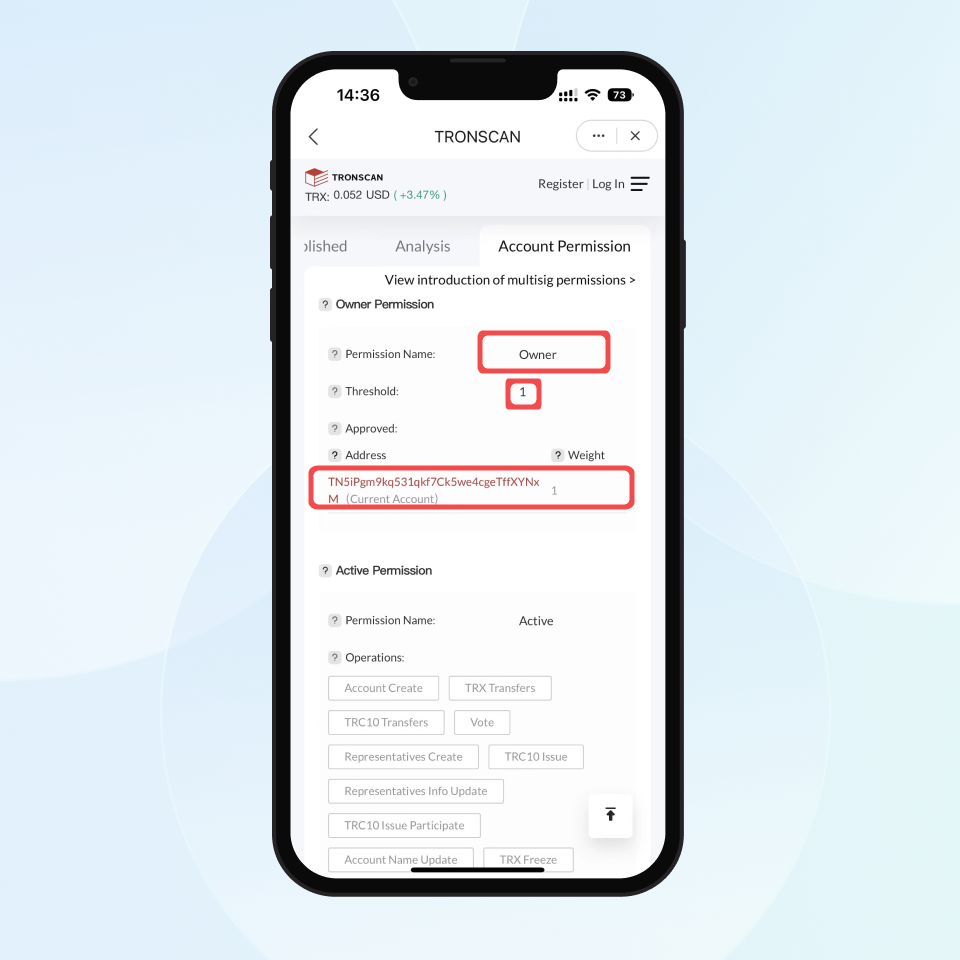
Note: owner permission stands for the supreme control of a TRX account. With that permission, an address can operate the account in all manners.
With the ill-gotten mnemonic, scammers will change the user’s TRX account permission to get the owner permission, turning the threshold into two. In this case, sending tokens through the wallet needs authorization signed both by the user’s address and the scammer’s address.
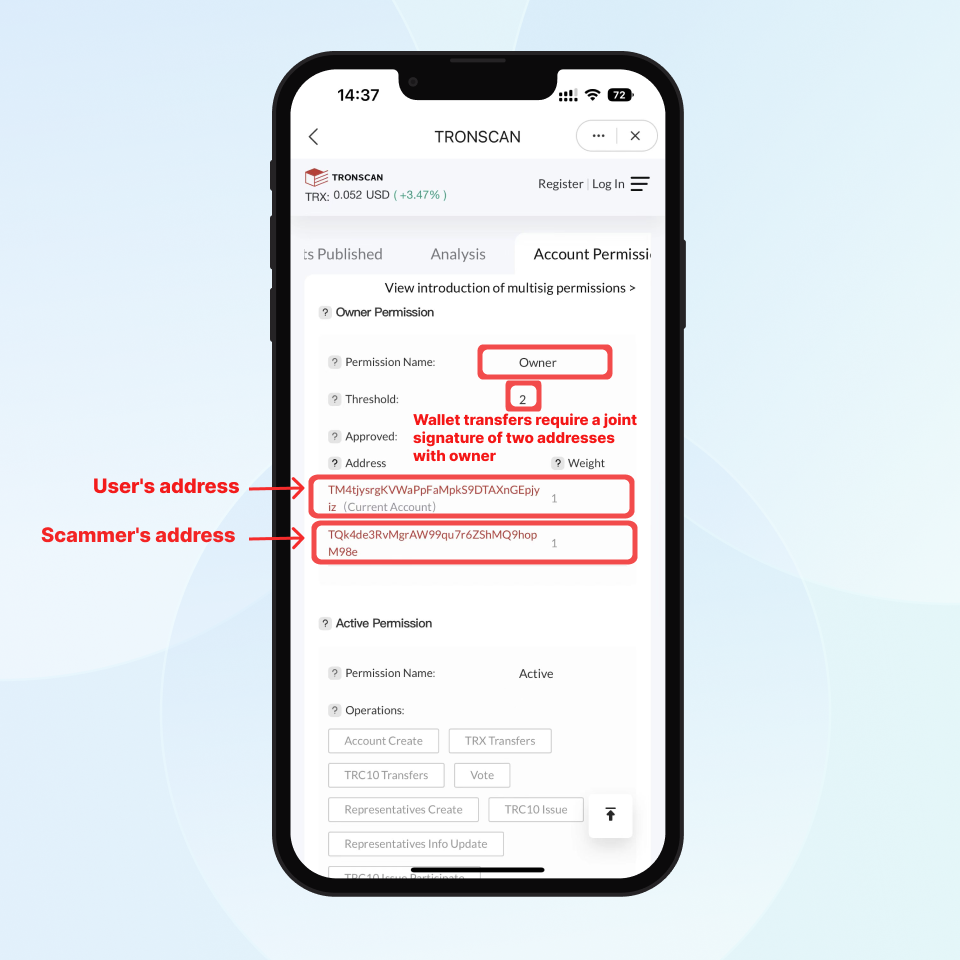
That is why such scams are called TRX multisig scams since the user needs signatures from both his address and the scammer’s to transfer through the TRX wallet. This means that authorization from the scammer’s address is needed for any transactions from the user. The user will encounter an error pop-up “server:SIGERROR” if his transaction does not have the scammer’s signature.
Suppose there is a firm with two partners, and they make it a rule that all major decisions can be executed only if both partners agree to sign the authorization, i.e., multi-signature. If one partner disagrees, the decision is not approved.
A multisig TRX account is similar to that company. Therefore, even with the mnemonic, the account user cannot make a transfer by himself.
Users can only transfer tokens into his account, but not out of it. Scammers take advantage of this to play the long game. The user may keep transferring tokens into the account if he only uses it to receive payments from others and never check out his account permission.
Apart from luring users to download a fake imToken App, scammers will also carry out TRX multisig scams in these two ways:
- Promoting top-up websites on social media platforms such as Telegram to lure users to deposit with their digital tokens. In fact, scammers can get the owner permission of a user’s account during depositing.
- Releasing their mnemonics or private keys on social media platforms such as Telegram and WhatsApp to lure users to send TRX as transaction fees into wallets. But in fact, the owner permissions of those wallets have already been transferred by scammers. In the end, all TRX in the wallets will be stolen.
PSA
imToken security team reminds you that
- Please go to https://token.im/ to download imToken.
- There is no such thing as a free lunch.
- Check out your TRX wallet account permission regularly.
How to check out your TRX wallet account permission?
1. Open your TRX wallet and switch to the “Browser” page. Enter TRONSCAN in the search box and launch the DApp.
Important Notice:imKey sells physical security hardware products only and does not provide any virtual asset trading, custody, or funds-related services. References to third-party wallets, exchanges, or decentralized applications are for compatibility purposes only; related functions and services are provided independently by third parties.
Scam Alert | Domain tokens in TRX wallet
Summary
Recently, some users reported receiving domain name tokens in their TRX wallets, which lure users to visit phishing sites to gain transfer permissions. imToken and Tronscan have blocked 370 such tokens, improving wallet interface cleanliness and preventing fraud. Users are advised not to visit links associated with these tokens and to report them through the "Help & Feedback" section in the app.
It was reported by some users that they received domain tokens such as 365haxi.com in their TRX wallet in early September. Scammers airdropped these domain tokens to users to lure them to visit phishing websites and gained access to the user's token allowance through malicious authorization, thus stealing the user's tokens.
imToken has teamed with the risk control department of Tronscan to block these scam tokens and 370 tokens have been blocked. On the one hand, it cleans the TRX wallet page, and on the other hand, it prevents users from visiting the phishing websites.
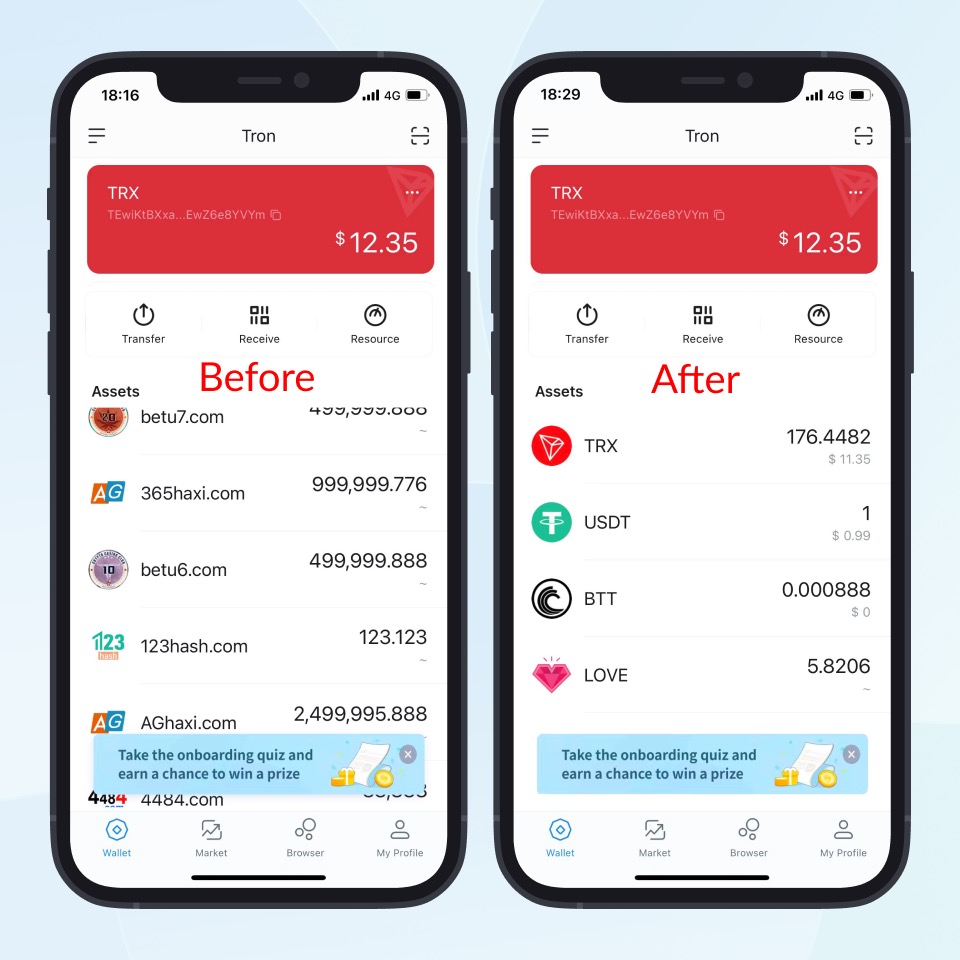
PSA: If you receive scam domain tokens in your wallet, do not visit the corresponding websites! And immediately report them to us via "Support and Feedback" in the App.
Important Notice:imKey sells physical security hardware products only and does not provide any virtual asset trading, custody, or funds-related services. References to third-party wallets, exchanges, or decentralized applications are for compatibility purposes only; related functions and services are provided independently by third parties.
Scam Alert | Addresses with the same last characters
Scammers deceive users by generating addresses with matching end digits and making small transfers, leading users to mistakenly believe they are transferring to a familiar address. imToken advises users to carefully verify addresses before making any transfers and recommends using the address book feature to save frequently used addresses to prevent errors.
Some users have a habit of copying the recipient address in their transaction history when transferring funds.
Scammers take advantage of this and generate fraud addresses with the same last characters. For example, in the picture below: the address that the user often transfer money to is "TWKWPn...krvgWS", and the fraud address is "TANWTY...grvgWS". They have the same last characters "rvgWS".
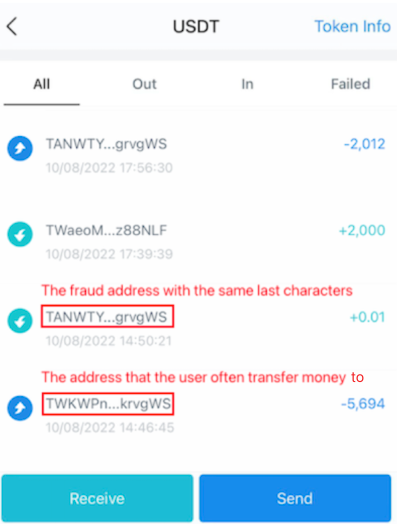
By transferring a small amount of money to the user, the fraud address will appear in his transaction history. When the user wants to start a transaction and copies the address from the history, he can easily make a mistake and transfer money to the fraud address if he only checks the last characters, resulting in loss of tokens.
PSA: Information stored on blockchain is non-temperable. So once your transfer is successful, it cannot be cancelled or changed. Please be sure to check the address carefully before transferring!
In addition, imToken recommends you to use the address book to keep the frequently used addresses. In this way, you can avoid transferring to a wrong address.
How to use the address book?
Set up your address book
Open imToken and click “My Profile” - “Address Book”. Then, click the “+” icon at the top right corner to add addresses.
Note: please check whether the added addresses are correct or not before clicking “save”.
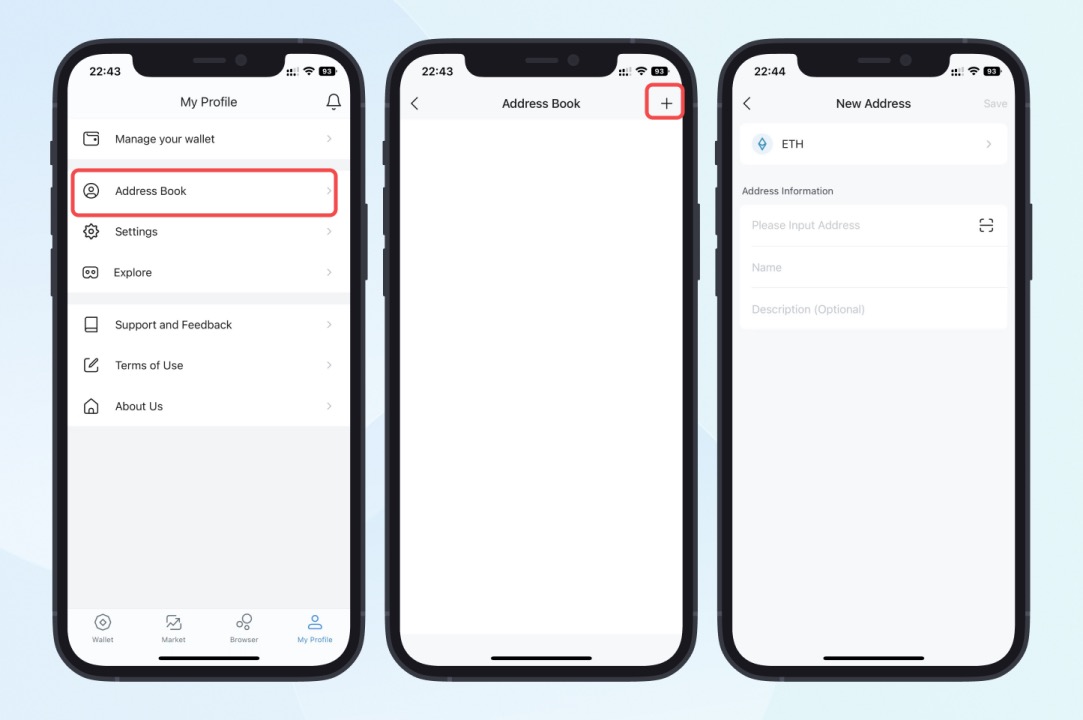
Make transactions with the address book
Here is an example to transfer USDT with the TRX wallet. First, choose USDT and click “Send” to enter the transfer page. Then, click the icon 
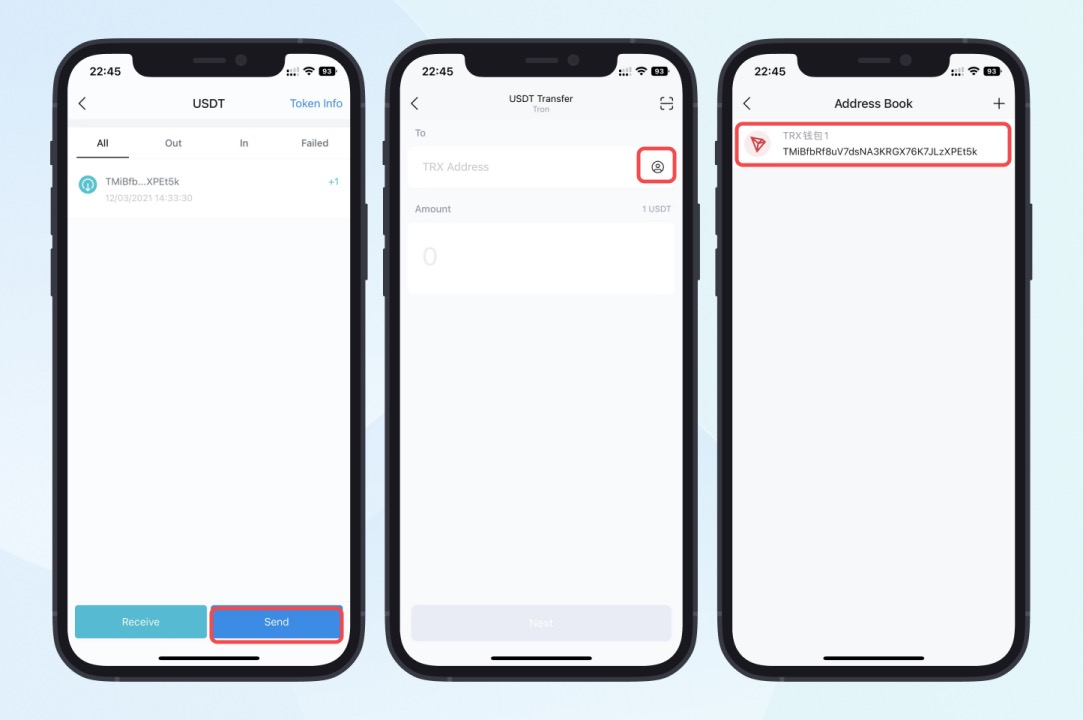
Important Notice:imKey sells physical security hardware products only and does not provide any virtual asset trading, custody, or funds-related services. References to third-party wallets, exchanges, or decentralized applications are for compatibility purposes only; related functions and services are provided independently by third parties.
My USDT was sent out from my wallet without my consent. How did that happen?
Summary
An authorization scam involves tricking users into performing transfers, staking, or similar operations to steal their token transfer permissions. Scammers typically use tactics such as purchasing virtual goods, QR code payments, or pretending to offer "staking mining" opportunities, leading to the theft of tokens from the user's wallet. Users should remain vigilant and properly manage their transfer permissions.

User A: I purchased a TikTok account online, but the payment failed, resulting in a deduction of my TRX. Additionally, my USDT disappeared unexpectedly.
User B: A guy asked me to scan a QR code and transfer 1 USDT to him. I did what he said then all my USDTs were sent out from my wallet without my consent. How did that happen?
User C: Someone told me I could earn rewards by depositing tokens into an address. I did as instructed because it was a good opportunity to grow money. After transferring money to that address, however, my wallet was drained.
How can a scammer drain your wallet without your consent? The answer is token approval.
What is Token Approval?
Google Play offers a family payment method through which your family members’ purchases, such as books and movies, are charged directly through your account. Even if your family doesn't know your Google Play password, they can still use your money.
Token approval is similar. When you unconsciously give a scammer the token approval authority, they can move your funds to their wallets without knowing your mnemonic or password.
And scammers often use virtual items, QR code payment and liquidity mining tricks to scam crypto investors. Let’s take a closer look at each of these tricks.
Inducement to Purchase Virtual Items
When you pay for virtual items such as TikTok accounts or SMS codes online, the scammer will direct you to make the payment through a crypto wallet.
If you are entering a page that "authorizes token transfer authority" during a payment, it indicates that you are authorizing a transaction, not making a regular transfer. If you enter your password and sign in on a fraudulent payment link created by scammers, you will grant them transfer authority for your tokens. With this authority, scammers can transfer tokens from your wallet without your permission.
Additionally, after the payment, the scam website often displays prompts like "payment failed," "insufficient TRX," "network connection error," or "insufficient funds," causing you to mistakenly believe the payment was unsuccessful. This may prompt you to switch to another address or transfer more tokens to continue the authorization. In reality, these pop-ups are set by the scammer on their fraudulent website, not genuine notifications from your wallet app. The scammer's aim is to gain transfer authority over more of your tokens.
QR Code Payment Trick
Here, scammers lure you to scan a QR code or click a link, which opens a scam website mimicking the transfer page of your wallet app. The site takes you through an imitation of the familiar transfer interface. Instead of the transaction confirmation, a window for approving unlimited token balance shows.
Note: You can distinguish between real and fake transfer pages by checking the icon in the upper right corner of a page. The icons in the top right corner of a fake page are "..." and "X," while that of a real page is a QR code scan icon.
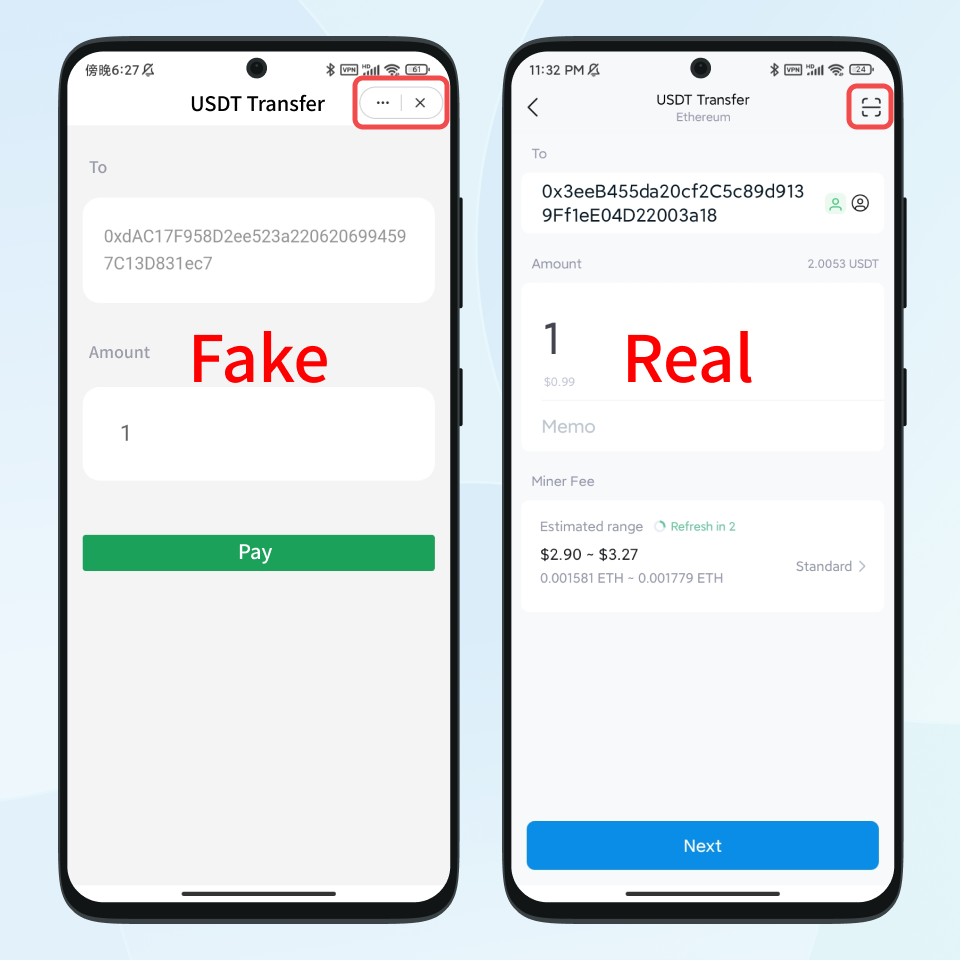
Liquidity Mining
Scammers impersonate imToken officials on channels such as Telegram, WhatsApp, Youtube etc. and offer you a salivating investment opportunity, such as depositing USDTs into their website and participating in liquidity mining or staking to get guaranteed daily earnings; the more tokens you deposit, the higher the rate of return.
Some scammers even tell you that no principal is required; pay some miner fees to join the network, then receive a stable income. Sounds too good to be true? Well, it probably is!
When you confirm a transaction on the scam website to start the so-called liquidity mining or staking, you give the scammer unlimited token allowance.
So when you make a transaction or invest in a project, please pay attention to whether the "Approve Allowance" page pops up in the app, and stay alert.
imToken Optimizes Signature Experience
In response to these three types of scams, imToken has optimized the signature experience. When you sign such transactions, imToken will clearly inform you that you are "approving a contract to transfer" and display the amount of tokens being approved. We advise you to stay vigilant during transactions. Additionally, if the approved recipient is a personal address, imToken will warn you that “there is a high likelihood of fraudulent activity.”
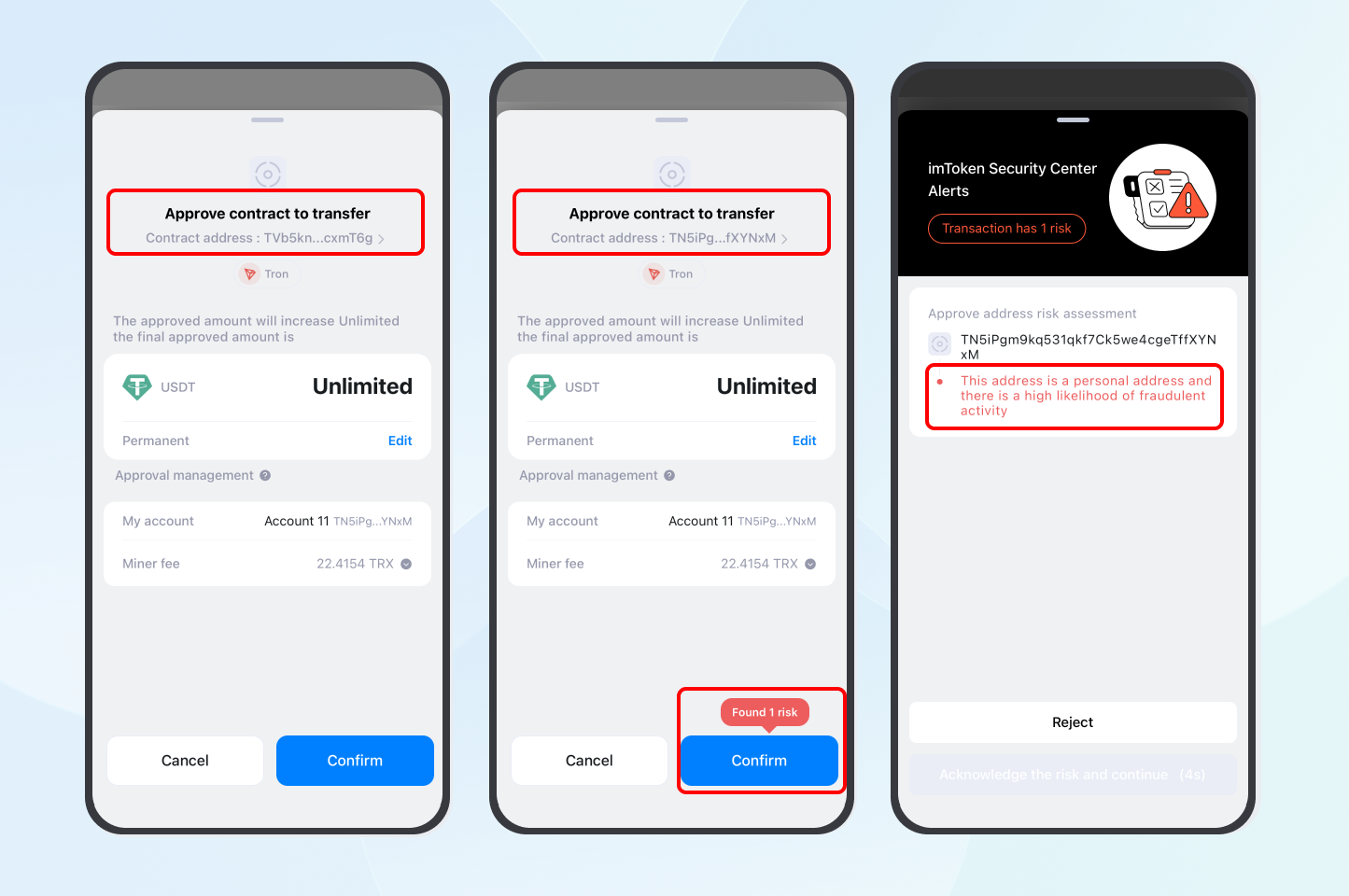
Security Reminder
- Be vigilant of SMS code reception, account purchases, fake exchanges, high-yield or guaranteed profit websites.
- Avoid making payments or transfers on unknown websites. Learn to differentiate between authorized and regular transactions, identify pages requesting unlimited authorization, and never enter your password for authorization on suspicious sites.
- Exercise caution with authorizations. On the authorization page, verify the contract address and check the contract label and transaction history using a block explorer to confirm the contract’s legitimacy.
How to Check Whether You Have Approved a Third Party to Transfer Your Tokens
Approve scams are common on Ethereum and TRON blockchains. This blog explains how to check and cancel the approval of your ETH and TRX addresses respectively.
TRX Wallet
Prerequisite:
Ensure you have at least 30 TRXs in your wallet for transaction charges. If not, please purchase some through exchanges and transfer them to your imToken TRX wallet.
1. Open the TRX wallet, swipe the function bar to the left, and tap "Revoke" to enter the "TRONSCAN" page, which automatically connects to the wallet for querying approvals.
Note: TRONSCAN is a tool for querying and managing TRX wallet approvals.
2. Scroll the page down and click "Approval," then all third-party addresses you have approved will be displayed on the page. If you find the "Approved amount" of an unknown project is unlimited or 999999…, it is likely to be a fraudulent address. Please revoke the approval immediately!
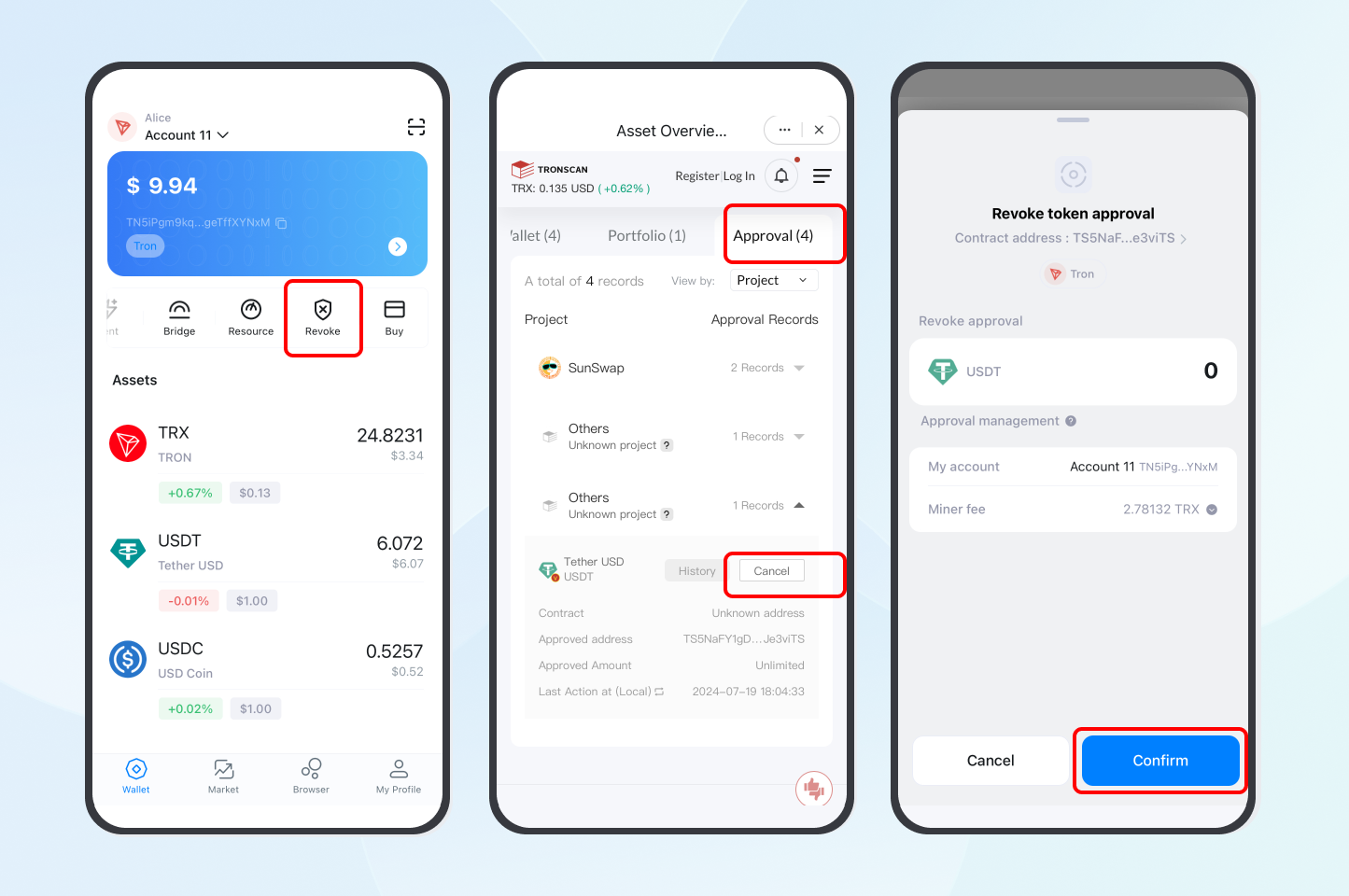
3. Click "Cancel" to revoke the approval. After the approval is successfully removed, the status will change from "Cancel" to "Canceled."
4. Check all your approval records to ensure all your unlimited token apptovals are canceled.
ETH Wallet
Prerequisite:
Ensure you have at least 0.02 ETH in your wallet for transaction fees. If not, please purchase some through exchanges and withdraw them to your imToken ETH wallet.
Note: When withdrawing tokens, please select "Ethereum Network" as your withdrawal network.
1. Open your imToken ETH wallet, swipe the function bar to the left, and tap "Revoke" to enter the "Revoke" page, which automatically connects to the wallet for querying approvals.
Revoke.cash: A tool that supports managing approvals across Ethereum, Arbitrum, Optimism, BSC, Polygon, Avalanche, and other networks. On this page, click the Ethereum icon to switch networks and view the approved details for the corresponding network.
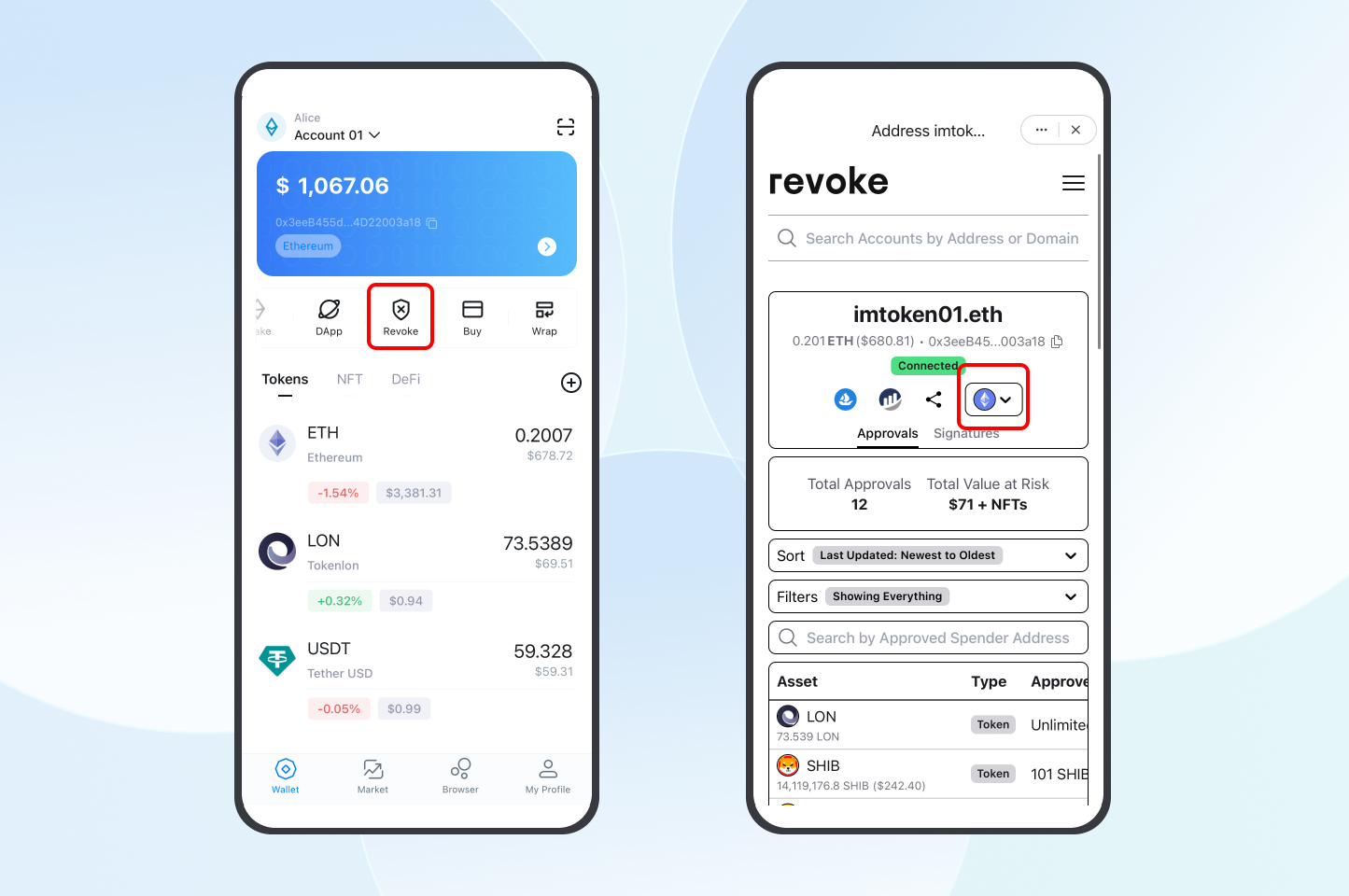
2. Scroll down to the bottom of the page to view the approved status of the account. Check your approved amounts, the approved Spender, and the last updated list.
If you want to revoke an approval, find the token or NFT in the approved list that you want to revoke, swipe left, and click 'Revoke.' Confirm again on the pop-up page to cancel the approval.
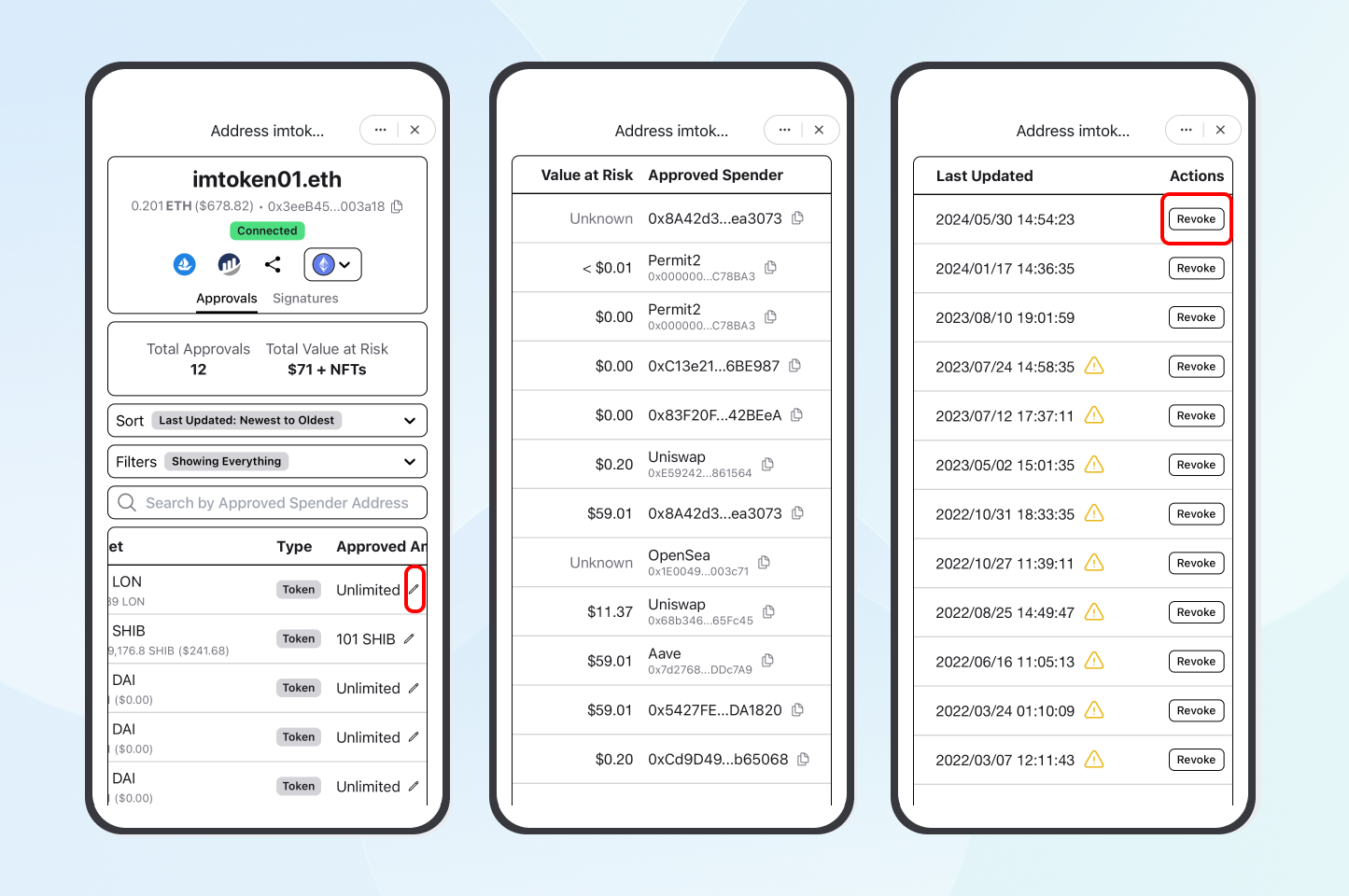
3. After the cancellation is done, return to the wallet home page and click "Activity" to check the status of the transaction. When the status changes from "Pending" to "Successful", it indicates that you have successfully canceled the approval.
4. If you want to change the token approved amount, click the "✏️" icon to the right of the amount to edit it. After entering the new value, click "Update" and confirm again on the pop-up page.
The middle picture above shows "Approved Spender" including Uniswap, Aave, etc. This is because when we trade in DEXs, we need to approve first to allow DEXs to complete token swaps.
However, if you find an unfamiliar address in the Spender column and you do not recognize or understand who controls that address, it is likely a scammer's address. Please cancel the approval immediately!
Conclusion
As we wrap up our exploration of unauthorized USDT transactions, the significance of staying informed and proactive cannot be overstated.
The insights gained into approve scams and scam victim experiences are crucial elements in the ongoing battle against crypto fraud. By raising awareness, understanding the tactics at play, and bolstering protective measures, we collectively contribute to a stronger defense against unauthorized access and potential loss. Let these lessons guide us as we traverse the dynamic world of Web3.
Contact us in the App or email us via support@token.im when in doubt.
Important Notice:imKey sells physical security hardware products only and does not provide any virtual asset trading, custody, or funds-related services. References to third-party wallets, exchanges, or decentralized applications are for compatibility purposes only; related functions and services are provided independently by third parties.
Beware of TRX wallet account permission change scam
Summary
In a recent TRX wallet account permission scam, scammers trick users into using a provided mnemonic phrase, which in reality updates the account permissions, transferring the highest authority to the scammer. As a result, users are unable to make transfers. Users should remain vigilant, avoid accepting mnemonic phrases from others, and ensure their security by downloading imToken through official channels.

What is TRX wallet account permission change scam
The thriving blockchain industry has been plagued by scams leading to assets lost. Scammers set novice crypto users up by taking advantage of the knowledge gap, such as cheating users’ transfer authorization by offering them good investment opportunities, or stealing mnemonics through fake official websites and Apps.
Recently, fraudsters have upgraded their scams to cheat others by exposing mnemonics. This article is a breakdown of the scam.
Since mid-May, many imToken users reported that they encountered an error pop-up when transferring through their TRX wallets. (Shown in the picture below)
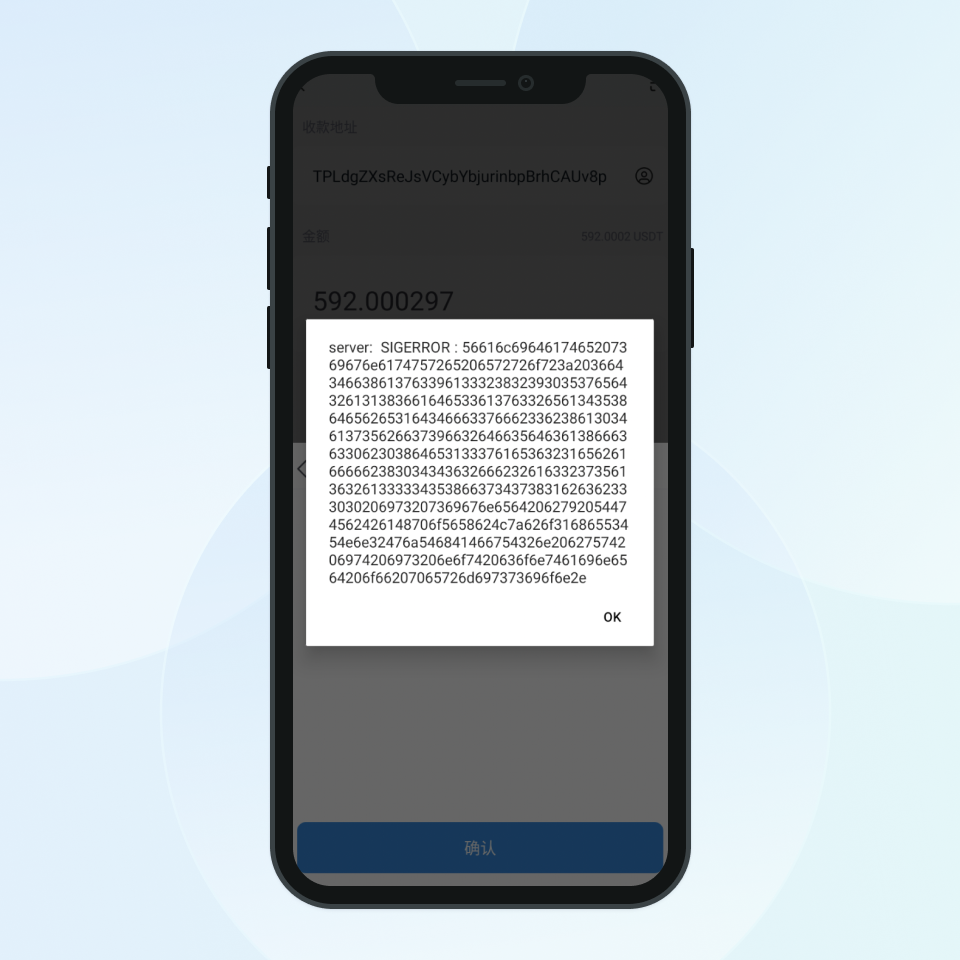
According to on-chain data, we found that those wallet addresses all have updated their account permissions.
The overview shows that the “Owner Address”, i.e. the user’s TRX wallet account, transferred its “Owner Permission”, the supreme control over an account, to address B. This means any transaction initiated by “Owner Address” should be approved by address B.
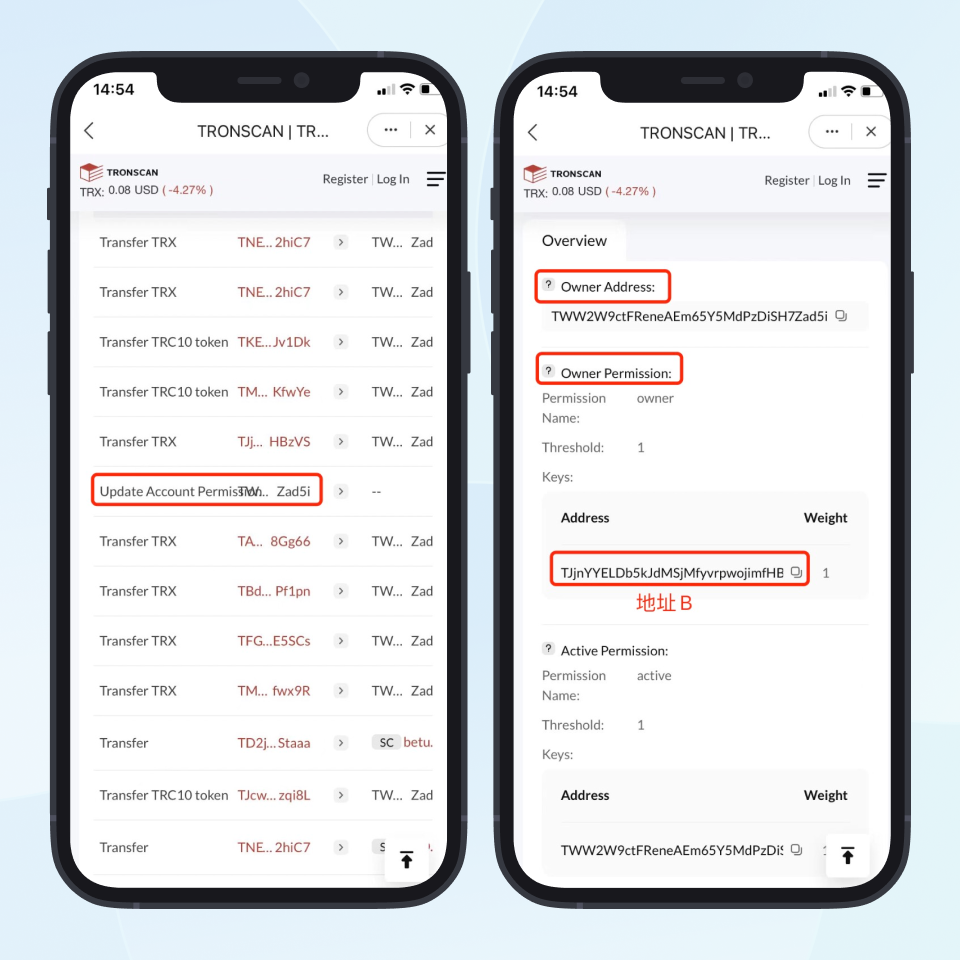
A TRX account usually has two permissions, namely, “Owner Permission” and “Active Permission”.
Owner permission represents the supreme control over an account. An address granted with that permission can operate the account in all manners.
In contrast, an address with active permission is only allowed to a combo of actions, such as transferring TRX and freezing assets.
Simply put, if users give up the owner permission and transfer it to a third party, they’ll get error pop-ups when starting a transaction.
So why would they give up the permission?
According to users’ feedback, their wallet mnemonics are given by others, not generated by themselves.
For instance, Tom lends $1000 to an internet friend who offers his mnemonic containing the commensurate amount of cryptocurrency in exchange.
Tom sees the tokens in the wallet after importing the mnemonic. However, an error pop-up shows up when he tries to transfer.
Because the internet friend, the scammer, updated the account permissions before giving Tom the mnemonic. The tokens in the wallet cannot be moved even though Tom has the mnemonic since the owner permission is only accessible to the scammer now.
Apart from tricking users to lend them money by offering mnemonics, scammers will also steal users’ mnemonics through enticing them to download fake imToken and change the owner permission, causing users to lose control of their accounts. In this circumstance, users can only transfer tokens into their wallets, but not out of them.
PSA:
- Please stay alert if someone wants to borrow money from you by giving his mnemonic. In this case, he is very likely to be a scammer.
Please go to https://token.im to download imToken and carefully keep your mnemonic without exposing it to others. If you download imToken from App Store or Google Play, make sure the developer is IMTOKEN PTE.LTD
Important Notice:imKey sells physical security hardware products only and does not provide any virtual asset trading, custody, or funds-related services. References to third-party wallets, exchanges, or decentralized applications are for compatibility purposes only; related functions and services are provided independently by third parties.
Security Tips: How to Safely Store Your Digital Wallet
Summary
This article addresses common security issues encountered when using decentralized wallets, including improper backup of mnemonic phrases, accidentally granting transaction permissions to malicious contracts, falling victim to scams, and hacker attacks. For each issue, the article provides detailed countermeasures to help users better protect their digital assets.
As cryptocurrency becomes more widespread, decentralized wallets are increasingly popular due to their high level of autonomy and security. However, using decentralized wallets also comes with certain security risks. This article will detail these common issues and provide corresponding strategies to help users better manage and protect their digital tokens.
1. Failure to Properly Back Up Mnemonic Phrases
Decentralized wallets do not store users' mnemonic phrases, and once lost, they cannot be recovered. Statistics show that one of the most common reasons for token loss is users failing to properly back up their wallet's mnemonic phrases. If a mnemonic phrase is lost or improperly stored, the tokens in the wallet may be permanently lost. Additionally, if the mnemonic phrase is not securely stored, the tokens can easily be accessed by others.
Countermeasures:
- Before using the wallet, ensure the correctness of the mnemonic phrase and back it up properly.
- Use physical media to back up the mnemonic phrase, such as writing it down on paper or using a mnemonic phrase storage box, to ensure its security.
- Ensure secure storage throughout the entire process, and consider necessary disaster recovery to avoid the risks of single-point backup failure.
2. Accidental Authorization of Transfer Permissions to Malicious Contracts
Authorization operations typically occur during interactions with DApps. Be cautious when granting permissions, as if the authorization is given to a malicious contract, the tokens in your wallet may be transferred without your confirmation. The DApp ecosystem is mixed, and careless authorization could lead to asset loss. The only way to avoid such risks is by increasing your security awareness.
Countermeasures:
- Review Contract Source Code: Seek professional auditors to review the contract code to ensure its security.
- Use Trusted Contracts: Prefer reputable and trusted contracts.
- Regularly Check Wallet Authorizations: If you notice your wallet has authorized unknown contracts, revoke the authorization as soon as possible. Recommended site for checking and revoking authorizations: https://revoke.cash/zh.
- Be Cautious with Transfer Permissions: Do not easily authorize transfer permissions, and remain vigilant after authorization, ready to revoke permissions if necessary.
3. Falling Victim to Scams
Scammers employ a variety of tactics, and users who are not highly alert may inadvertently give away their mnemonic phrases or transfer permissions, leading to token theft.
Countermeasures:
- Protect Your Mnemonic Phrases/Private Keys: Any request for your mnemonic phrases/private keys via SMS/phone scams is untrustworthy.
- Avoid Clicking Unknown Links or Downloading Unknown Software: These could be phishing sites disguised by hackers.
- Ensure Website Security: Use reputable websites and ensure that the site's security certificate is valid.
- Regularly Monitor Accounts: Regularly check your wallet accounts to ensure their security.
- Consult Professionals: If you encounter a scam, consult professional institutions or the police.
4. Being Hacked
On the blockchain, mnemonic phrases represent ownership of assets. Once someone else gains access to your mnemonic phrases, they can import them into another device and steal your tokens. Therefore, it's crucial to securely generate and back up mnemonic phrases.
Countermeasures:
- Use Offline Hardware Wallets: Generate and store private keys with offline hardware wallets to enhance security. Avoid storing them on internet-connected mobile devices to prevent hacking and theft.
- Download Wallet Software and Apps Only from Official Channels: Avoid downloading unverified software to minimize security risks and prevent malware from stealing your digital assets or other sensitive information.
- Avoid Copying and Pasting Mnemonic Phrases or Private Keys: Manually enter them to enhance security. Additionally, avoid jailbreaking or rooting your device to prevent hackers from exploiting vulnerabilities to steal your digital assets or other sensitive information. Do not visit unknown links to avoid phishing attacks and data breaches; only visit known and trusted links.
Additional Recommendations
-
Separate Hot and Cold Wallets
- Hot wallets (e.g., imToken) are easy to use but require good security awareness. Hardware wallets (e.g., imKey) use secure chips to maximize private key security at the hardware level, making them more beginner-friendly. It is recommended to use imToken software wallets for small assets and imKey hardware wallets for large assets. Combining both ensures a good user experience while maximizing asset security.
-
Regularly Update Software and Operating Systems
- Regularly update or upgrade the software and operating systems on your devices to fix vulnerabilities or bugs and prevent hacker attacks.
-
Manage Applications on Your Device
- Limit applications' auto-start settings, thoroughly delete unnecessary applications, and avoid installing software from unknown sources. Avoid installing applications with remote desktop viewing functions, as malicious actors may use them to spy on your desktop and steal your mnemonic phrases or private keys.
-
Disable Cloud Storage
- Do not use automatic cloud functions to upload sensitive data to online accounts, as this could lead to sensitive information leaks if cloud data is compromised.
-
Use Strong Passwords
- Set strong passwords that include uppercase letters, lowercase letters, numbers, and special characters, and regularly change your passwords.
Final Recommendations
Decentralized wallets offer users greater security and autonomy, but they also come with certain security risks. By understanding these common issues and adopting the corresponding strategies, users can better protect their digital assets.
Lastly, in the "dark forest" of the blockchain world, always remember these two security principles:
- Zero Trust: Maintain a high level of skepticism at all times.
Continuous Security Validation: If you choose to trust something, you must have the ability to verify your doubts and make this practice a habit.
Important Notice:imKey sells physical security hardware products only and does not provide any virtual asset trading, custody, or funds-related services. References to third-party wallets, exchanges, or decentralized applications are for compatibility purposes only; related functions and services are provided independently by third parties.
Experience Web3 Projects
See all articlesimKey RWA NFT Purchase and Physical Delivery Guide
Notice:
The imKey RWA NFT purchase service on RareShop has been discontinued.For users involved in physical asset delivery, please go to this official page to complete the delivery process: https://rwa.imkey.im/
This guide will walk you through the process of purchasing imKey hardware wallet RWA NFTs on RareShop and claiming physical delivery.
1. RWA NFT Project Overview
RareShop has partnered with imKey, the hardware wallet brand under imToken, to issue an RWA NFT for the imKey family pack on the Mint Network, based on the ERC7765 asset protocol standard. Priced at $139, this NFT allows users to opt for physical delivery, gift transfers, and potentially receive airdrop rewards from the Mint ecosystem. RareShop offers an all-in-one Web3 digital solution for businesses and brands, supporting crypto payments, privacy protection, and product pre-sales.
Key Links:
2. Step-by-Step Purchase Guide
Step 1: Bridge funds to Mint Blockchain
Utilize the fast cross-chain bridge on Mint Blockchain to quickly, securely, and affordably transfer assets to Mint, ensuring efficient transfers while maintaining robust security and low fees.
🍀Steps to Use Mint Fast Bridge
- Visit the Official Website: Go to the Mint Blockchain website Bridge page.
- Connect Your Wallet: Click on the "Connect Wallet" and follow the prompts to link your wallet.
- Choose the Chains: Select the blockchain from which you want to transfer assets to Mint Blockchain.
- Complete the Transfer: Enter the amount you wish to transfer and confirm the transaction.
🍀Tips
Large Transfers: IFor deposits over 2 ETH or withdrawals over 0.5 ETH, use the official Mint Superbridge for a more robust solution.
Specific Tokens: For USDC or USDT cross-chain transfers, head over to the official Mint Superbridge for an optimal experience.
Step 2: Purchase the imKey RWA NFT on RareShop
- Go to the purchase page .
- Connect your wallet.
- Purchase the imKey RWA NFT with either 139 USDT or USDC.
- If you are a MintID or activated GreenID NFT holder, you’ll receive a $15 cashback. New users to the Mint ecosystem, among the first 5,000, will receive a $15 coupon for your next RareShop purchase.
Step 3: Physical delivery
- Go to the physical delivery page .
- Please complete the required shipping information. Shipping costs will be calculated based on your delivery location. If your country/region isn’t listed, select “Other” and provide details for your country/region. A flat rate of 40 USDT will be applied.
By following the steps above, you can successfully purchase and redeem your imKey RWA NFT and enjoy a new on-chain shopping experience.
Important Notice:imKey sells physical security hardware products only and does not provide any virtual asset trading, custody, or funds-related services. References to third-party wallets, exchanges, or decentralized applications are for compatibility purposes only; related functions and services are provided independently by third parties.
How to use imKey Pro to swap in Tokenlon?
This article provides a step-by-step guide on how to use imKey to perform token swaps on the decentralized exchange Tokenlon.
Besides securely storing assets, imKey also supports the use of Tokenlon's swap feature for tokens trading.
What is Tokenlon?
Tokenlon is a decentralized trading and settlement protocol that provides users with fast, competitively priced, and diverse decentralized cryptocurrency exchange services.
How to use imKey Pro to swap in Tokenlon?
- Open the ETH wallet on imKey and enter the "Market" page. On the market page, set the token and amount you want to exchange, then click "Review".
- After reading the Tokenlon Service Terms, click "I have read and agree to the Tokenlon Service Terms" and confirm.
- After verifying that the order information is correct, click "Request imKey Confirmation" and confirm by signing with imKey. Please wait patiently until the exchange is successful. Note: The signing process requires multiple confirmations.
Note: The signing process requires multiple confirmations.
Note: If prompted "Order has expired, please place your order again," it means that the transaction request has timed out, and you will need to click "Request imKey Confirmation" again and complete the signing with imKey.
- Return to the ETH wallet and check if the assets have arrived. If not, click '+' - 'All My Assets', then click the '+' symbol on the right side of the token to add the token to the wallet homepage.
Important Notice:imKey sells physical security hardware products only and does not provide any virtual asset trading, custody, or funds-related services. References to third-party wallets, exchanges, or decentralized applications are for compatibility purposes only; related functions and services are provided independently by third parties.
How to Use Orbiter Finance with imKey?
Summary
To perform cross-chain asset transfers using Orbiter Finance with imKey, open imKey, switch to the Ethereum network, search for and open the Orbiter Finance app. Select the token and network you want to transfer to, enter the amount, click confirm, and complete the signature on the hardware device. After the transaction is complete, switch to the target network to check your assets. If you encounter any issues, contact Orbiter Finance official support.
What is Orbiter Finance?
Orbiter Finance is a decentralized cross-rollup bridge for transferring the Ethereum-native tokens, which is the infrastructure of Layer 2, it offers low cost and almost instant transfers. Orbiter Alpha supports cross-rollup transfers between Ethereum, StarkNet, zkSync, Loopring, Arbitrum, Optimism, Polygon, BNB Chain, ZKSpace, Immutable X, dYdX, Metis and Boba.
Click here to know more about Orbiter Finance.
How to Transfer Tokens through Orbiter Finance?
Orbiter Finance allows you to move your tokens across different blockchains. Here are the steps to transfer USDT from Polygon to zkSync through the bridge:
- Open the imKey wallet, click on "Bridge" find "Orbiter " and open the app.
- Click "Confirm" to allow the app to access your wallet address.
- Select the token you want to transfer cross-chain, as well as the networks for sending and receiving the assets.
- After entering the amount of tokens to transfer, click "SEND," then "CONFIRM AND SEND," and finally "Request confirmation from imKey." Complete the signature confirmation on the hardware device.
- Wait for the status to change from "Processing" to "Completed," and for three green checkmarks to appear below, indicating that the transaction is complete. Then, return to the imKey homepage, switch to the zkSync Era network, and you will be able to see your assets.
If you encounter any issues while using Orbiter Finance, please contact Orbiter Finance support through the following channels:
- Discord: http://discord.gg/orbiter-finance
- Twitter: https://twitter.com/Orbiter_Finance
Lastly
imKey is a professional hardware cold wallet incubated by imToken, deeply integrated with imToken and also supporting the Layer2 ecosystem. If you have higher security requirements for your wallet or need to store large amounts of assets, we strongly recommend using the imKey hardware wallet. imKey will provide you with exceptional security and a convenient user experience.
Risk Disclaimer: The content of this article does not constitute any form of investment advice or recommendation. imToken makes no guarantees or commitments regarding the third-party services and products mentioned in this article and assumes no responsibility. Token investments carry risks; please carefully assess these risks and consult relevant professionals before making any decisions.
Important Notice:imKey sells physical security hardware products only and does not provide any virtual asset trading, custody, or funds-related services. References to third-party wallets, exchanges, or decentralized applications are for compatibility purposes only; related functions and services are provided independently by third parties.
How to Rent Tron Energy on Feee.io?
What is Feee.io?
Feee.io is an energy rental platform on TRON, where users can obtain the energy they need at a lower cost from TRX stakers. This effectively reduces the burning of TRX in their accounts and decreases transaction fees when transferring USDT.
The rental period for energy can range from 1 hour to 1 month. Read more information about Feee.io.
How to Use Feee.io in imToken?
1. Enter imToken, switch to the TRON account, and click "Rent” to launch Feee.io.
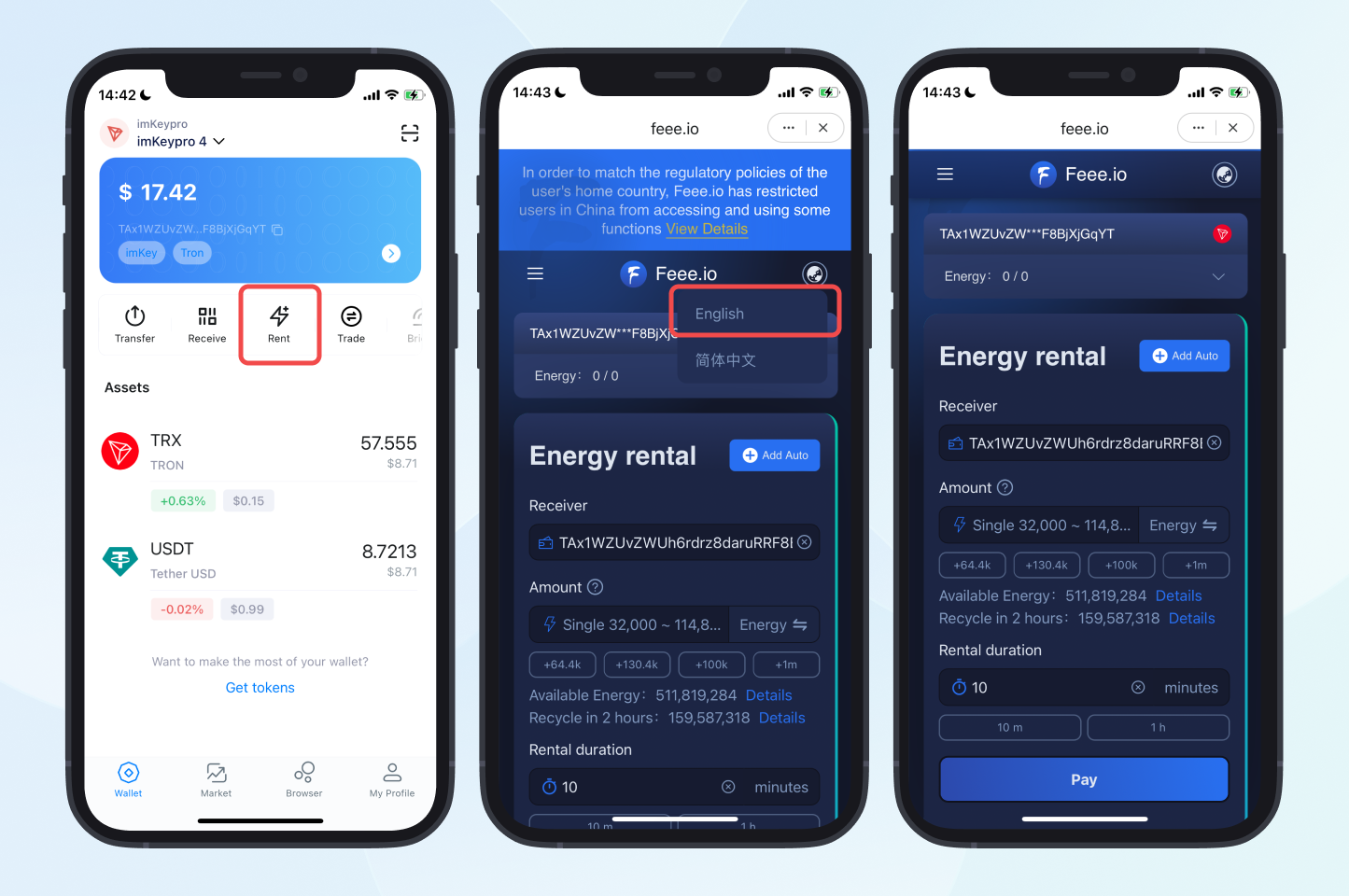
2. The default recipient is your current wallet address. Enter the amount of energy and rental duration you need, click "Pay", and confirm the payment again in the pop-up window. Once the order is completed, the energy will be credited to the corresponding account.
FAQ
Q1. When will the energy be credited after a successful payment?
A: The energy will be credited within a few minutes after payment. Due to broadcasting delays and other reasons, there may be a delay of 5 to 10 minutes in rare cases.
Q2. How long does it take for energy to recover after use?
A: The energy will be restored within 24 hours after use.
Q3. How to rent bandwidth?
A: You can enter the "Trading Market" from the menu bar in the upper left corner of Feee.io, click "Buy" and select bandwidth.
Q4. Can an order be canceled?
A: Once an order is created, it cannot be canceled.
Q5. What should I do if the order fails but tokens are still deducted?
A: You can send an email to service@feee.io or contact the official customer service of Feee.io on Telegram at @trongascom.
Learn more about Feee.io FAQs.
Risk Warning: The content of this article does not constitute any form of investment advice or recommendation. imToken does not make any guarantees and promises for the third-party services and products mentioned in this article, nor assume any responsibility. Token investment has risks. You should carefully evaluate these investment risks and consult with relevant professionals to make your own decisions.
Important Notice:imKey sells physical security hardware products only and does not provide any virtual asset trading, custody, or funds-related services. References to third-party wallets, exchanges, or decentralized applications are for compatibility purposes only; related functions and services are provided independently by third parties.
How to Participate in Non-Custodial ETH Staking with imKey?
If you hold 32 or more ETH, you can choose to use imKey to participate in non-custodial ETH staking. This article will guide you step-by-step on how to do it.
imKey hardware wallet now officially supports non-custodial ETH staking in imToken.
imToken’s 'non-custodial' solution is suitable for users with high requirements for asset security. This approach allows staking users to earn stable returns while ensuring maximum ownership and control over their staked assets, without the need to worry about the operational services of the validator node.
If you have 32 or more ETH, you can choose the non-custodial staking solution and own a validator node at the Ethereum consensus layer.
Step-by-Step Tutorial for Non-Custodial ETH Staking with imKey
- Open imToken, click on the navigation bar in the top left corner to enter the 'Select Account' page, then click on the ETH account of the imKey hardware wallet.
2.On the ETH wallet homepage of imKey, click 'Stake' to access the ETH staking page, then click 'Stake' again. Enter the number of validators you want to purchase. One validator requires a deposit of 32 ETH. After confirming the number of validators, click 'Next' to access the fee confirmation page.
3. Choose the imKey ETH wallet address and confirm the fees. The fees are divided into four parts:
- Staking Amount: Each validator requires 32 ETH to be staked.
- Service Fee: InfStones charges a service fee of 0.2 ETH/validator/year for maintaining node operations.
- Block Reward Sharing: Automatically distributed proportionally each time additional block rewards are generated, with 80% allocated to the validator and 20% to the service provider.
- Gas Fee: The gas fee required to send the transaction. It varies depending on the real-time Ethereum network situation.
Note: The current service fee is 0.2 ETH/validator/year. Please refer to the service fee shown in your wallet when staking.
4. Carefully read the risk terms. After verifying that they are correct, check the box to confirm the terms. Please note:
- The mnemonic phrase of your imKey ETH wallet will be used to retrieve the assets staked on the consensus layer. Therefore, back up your mnemonic phrase securely. You cannot retrieve the staked ETH principal and accumulated earnings if you lose your mnemonic phrase.
- For backing up your mnemonic phrase, it is recommended to use the imKey stainless steel mnemonic phrase HeirBoxes.
5. After confirming the terms, the 'In-App signature' interface will be prompted. Click 'Request confirmation from imKey', and then confirm the authorization signature on your imKey.
6. After the 'Creating Validators' process is completed, proceed to the request staking step. Click 'Request confirmation from imKey', and at the same time, confirm the payment information, recipient address, and gas fee on your imKey.
7. Wait for Consensus Layer Confirmation and Validator Activation
- After a successful transaction, wait for the consensus layer confirmation, which will take 12-18 hours.
- Once the transaction is confirmed on the consensus layer, the validator will be in a 'Pending' state, waiting for activation. You will wait for activation since only 900 validators are activated per day. As of press time, the activation waiting time is about four days.
- When the validator reads "Active" status, it means it has been activated and is generating rewards. You can check APR and accumulated earnings on the ETH staking interface.
- Beacon Chain explorers:
Rewards Explanation
ETH staking earnings consist of two parts:
- Staking rewards: Validators receive this reward for checking new blocks and “attesting” to if they are valid at the Ethereum consensus layer.
- Block rewards: When a validator is chosen to propose the next block, it can obtain the gas fees for all transactions in the corresponding block. In addition, it can also receive additional auction income through the block auction market.
You can learn more about the Rewards Structure of Non-Custodial ETH Staking Services.
Important Notice:imKey sells physical security hardware products only and does not provide any virtual asset trading, custody, or funds-related services. References to third-party wallets, exchanges, or decentralized applications are for compatibility purposes only; related functions and services are provided independently by third parties.